
Fixed-Effect Demand Modeling with `beezdemand`
Brent Kaplan
2026-09-21
Source:vignettes/fixed-demand.Rmd
fixed-demand.RmdIntroduction
This vignette demonstrates how to fit individual (fixed-effect)
demand curves using fit_demand_fixed(). This function fits
separate nonlinear least squares (NLS) models for each subject,
producing per-subject estimates of demand parameters like Q_{0} (intensity) and \alpha (elasticity).
Fixed-effect models are appropriate when you want independent curve
fits for each participant. They make no assumptions about the
distribution of parameters across subjects and are the simplest approach
to demand curve analysis. For hierarchical models that share information
across subjects, see vignette("mixed-demand"). For guidance
on choosing between approaches, see
vignette("model-selection").
All modeling functions expect long-format data with columns
id (subject identifier), x (price), and
y (consumption). See vignette("beezdemand")
for details on data preparation and conversion from wide format.
Fitting with Different Equations
fit_demand_fixed() supports several equation forms. We
demonstrate the three most common below using the apt
(Alcohol Purchase Task) dataset.
Hursh & Silberberg (“hs”)
The exponential model of demand (Hursh & Silberberg, 2008):
\log_{10}(Q) = \log_{10}(Q_0) + k \cdot (e^{-\alpha \cdot Q_0 \cdot x} - 1)
fit_hs <- fit_demand_fixed(apt, equation = "hs", k = 2)
fit_hs
#>
#> Fixed-Effect Demand Model
#> ==========================
#>
#> Call:
#> fit_demand_fixed(data = apt, equation = "hs", k = 2)
#>
#> Equation: hs
#> k: fixed (2)
#> Subjects: 10 ( 10 converged, 0 failed)
#>
#> Use summary() for parameter summaries, tidy() for tidy output.
Koffarnus (“koff”)
The exponentiated model (Koffarnus et al., 2015):
Q = Q_0 \cdot 10^{k \cdot (e^{-\alpha \cdot Q_0 \cdot x} - 1)}
fit_koff <- fit_demand_fixed(apt, equation = "koff", k = 2)
fit_koff
#>
#> Fixed-Effect Demand Model
#> ==========================
#>
#> Call:
#> fit_demand_fixed(data = apt, equation = "koff", k = 2)
#>
#> Equation: koff
#> k: fixed (2)
#> Subjects: 10 ( 10 converged, 0 failed)
#>
#> Use summary() for parameter summaries, tidy() for tidy output.
Simplified (“simplified”)
The simplified exponential model (Rzeszutek et al., 2025) does not require a scaling constant k:
Q = Q_0 \cdot e^{-\alpha \cdot Q_0 \cdot x}
fit_simplified <- fit_demand_fixed(apt, equation = "simplified")
fit_simplified
#>
#> Fixed-Effect Demand Model
#> ==========================
#>
#> Call:
#> fit_demand_fixed(data = apt, equation = "simplified")
#>
#> Equation: simplified
#> k: none (simplified equation)
#> Subjects: 10 ( 10 converged, 0 failed)
#>
#> Use summary() for parameter summaries, tidy() for tidy output.
The k Parameter
The scaling constant k controls the
range of the demand function. For the "hs" and
"koff" equations, k can be specified in
several ways:
k value |
Behavior |
|---|---|
Numeric (e.g., 2) |
Fixed constant for all subjects (default) |
"ind" |
Individual k per subject, computed from each subject’s data range |
"share" |
Single shared k estimated across all subjects via global regression |
"fit" |
k is a free parameter estimated jointly with Q_0 and \alpha |
## Fixed k (default)
fit_demand_fixed(apt, equation = "hs", k = 2)

## Individual k per subject
fit_demand_fixed(apt, equation = "hs", k = "ind")

## Shared k across subjects
fit_demand_fixed(apt, equation = "hs", k = "share")

## Fitted k as free parameter
fit_demand_fixed(apt, equation = "hs", k = "fit")
The param_space argument controls whether optimization
is performed on the natural scale ("natural", the default)
or log10 scale ("log10"). The log10 scale can improve
convergence for some datasets:
fit_demand_fixed(apt, equation = "hs", k = 2, param_space = "log10")Inspecting Fits
All beezdemand_fixed objects support the standard
tidy(), glance(), augment(), and
confint() methods for programmatic access to results.
tidy(): Per-Subject Parameter Estimates
tidy(fit_hs)
#> # A tibble: 40 × 10
#>    id    term  estimate std.error statistic p.value component estimate_scale
#>    <chr> <chr>    <dbl>     <dbl>     <dbl>   <dbl> <chr>     <chr>
#>  1 19    Q0       10.2      0.269        NA      NA fixed     natural
#>  2 30    Q0        2.81     0.226        NA      NA fixed     natural
#>  3 38    Q0        4.50     0.215        NA      NA fixed     natural
#>  4 60    Q0        9.92     0.459        NA      NA fixed     natural
#>  5 68    Q0       10.4      0.329        NA      NA fixed     natural
#>  6 106   Q0        5.68     0.300        NA      NA fixed     natural
#>  7 113   Q0        6.20     0.174        NA      NA fixed     natural
#>  8 142   Q0        6.17     0.641        NA      NA fixed     natural
#>  9 156   Q0        8.35     0.411        NA      NA fixed     natural
#> 10 188   Q0        6.30     0.564        NA      NA fixed     natural
#> # ℹ 30 more rows
#> # ℹ 2 more variables: term_display <chr>, estimate_internal <dbl>
glance(): Model-Level Summary
glance(fit_hs)
#> # A tibble: 1 × 12
#>   model_class      backend equation k_spec     nobs n_subjects n_success n_fail
#>   <chr>            <chr>   <chr>    <chr>     <int>      <int>     <int>  <int>
#> 1 beezdemand_fixed legacy  hs       fixed (2)   146         10        10      0
#> # ℹ 4 more variables: converged <lgl>, logLik <dbl>, AIC <dbl>, BIC <dbl>
augment(): Fitted Values and Residuals
augment(fit_hs)
#> # A tibble: 146 × 6
#>    id        x     y     k .fitted  .resid
#>    <chr> <dbl> <dbl> <dbl>   <dbl>   <dbl>
#>  1 19      0      10     2   10.2  -0.159
#>  2 19      0.5    10     2    9.69  0.314
#>  3 19      1      10     2    9.24  0.760
#>  4 19      1.5     8     2    8.82 -0.819
#>  5 19      2       8     2    8.42 -0.421
#>  6 19      2.5     8     2    8.04 -0.0444
#>  7 19      3       7     2    7.69 -0.689
#>  8 19      4       7     2    7.03 -0.0334
#>  9 19      5       7     2    6.45  0.554
#> 10 19      6       6     2    5.92  0.0820
#> # ℹ 136 more rows
confint(): Confidence Intervals
confint(fit_hs)
#> # A tibble: 40 × 6
#>    id    term  estimate conf.low conf.high level
#>    <chr> <chr>    <dbl>    <dbl>     <dbl> <dbl>
#>  1 19    Q0       10.2      9.63     10.7   0.95
#>  2 30    Q0        2.81     2.36      3.25  0.95
#>  3 38    Q0        4.50     4.08      4.92  0.95
#>  4 60    Q0        9.92     9.02     10.8   0.95
#>  5 68    Q0       10.4      9.75     11.0   0.95
#>  6 106   Q0        5.68     5.10      6.27  0.95
#>  7 113   Q0        6.20     5.85      6.54  0.95
#>  8 142   Q0        6.17     4.92      7.43  0.95
#>  9 156   Q0        8.35     7.54      9.15  0.95
#> 10 188   Q0        6.30     5.20      7.41  0.95
#> # ℹ 30 more rows
summary(): Formatted Summary
The summary() method provides a formatted overview
including parameter distributions across subjects:
summary(fit_hs)
#>
#> Fixed-Effect Demand Model Summary
#> ==================================================
#>
#> Equation: hs
#> k: fixed (2)
#>
#> Fit Summary:
#>   Total subjects: 10
#>   Converged: 10
#>   Failed: 0
#>   Total observations: 146
#>
#> Parameter Summary (across subjects):
#>   Q0:
#>     Median: 6.2498
#>     Range: [ 2.8074 , 10.3904 ]
#>   alpha:
#>     Median: 0.004251
#>     Range: [ 0.001987 , 0.00785 ]
#>
#> Per-subject coefficients:
#> -------------------------
#> # A tibble: 40 × 10
#>    id    term      estimate std.error statistic p.value component estimate_scale
#>    <chr> <chr>        <dbl>     <dbl>     <dbl>   <dbl> <chr>     <chr>
#>  1 106   Q0         5.68     0.300           NA      NA fixed     natural
#>  2 106   alpha      0.00628  0.000432        NA      NA fixed     natural
#>  3 106   alpha_st…  0.0257   0.00176         NA      NA fixed     natural
#>  4 106   k          2       NA               NA      NA fixed     natural
#>  5 113   Q0         6.20     0.174           NA      NA fixed     natural
#>  6 113   alpha      0.00199  0.000109        NA      NA fixed     natural
#>  7 113   alpha_st…  0.00812  0.000447        NA      NA fixed     natural
#>  8 113   k          2       NA               NA      NA fixed     natural
#>  9 142   Q0         6.17     0.641           NA      NA fixed     natural
#> 10 142   alpha      0.00237  0.000400        NA      NA fixed     natural
#> # ℹ 30 more rows
#> # ℹ 2 more variables: term_display <chr>, estimate_internal <dbl>
Normalized Alpha (\alpha^*)
When k varies across participants or
studies (e.g., k = "ind" or k = "fit"), raw
\alpha values are not directly
comparable. The alpha_star column in tidy()
output provides a normalized version (Strategy B; Rzeszutek et al.,
2025) that adjusts for the scaling constant:
\alpha^* = \frac{-\alpha}{\ln\!\left(1 - \frac{1}{k \cdot \ln(b)}\right)}
where b is the logarithmic base (10
for HS/Koff equations). Standard errors are computed via the delta
method. alpha_star requires k
\cdot \ln(b) > 1; otherwise NA is returned.
tidy(fit_hs) |>
  filter(term == "alpha_star") |>
  select(id, term, estimate, std.error)
#> # A tibble: 10 × 4
#>    id    term       estimate std.error
#>    <chr> <chr>         <dbl>     <dbl>
#>  1 19    alpha_star  0.00836  0.000249
#>  2 30    alpha_star  0.0240   0.00276
#>  3 38    alpha_star  0.0172   0.00146
#>  4 60    alpha_star  0.0176   0.000592
#>  5 68    alpha_star  0.0113   0.000394
#>  6 106   alpha_star  0.0257   0.00176
#>  7 113   alpha_star  0.00812  0.000447
#>  8 142   alpha_star  0.00969  0.00163
#>  9 156   alpha_star  0.0193   0.000668
#> 10 188   alpha_star  0.0321   0.00184
Plotting
Basic Demand Curves
The plot() method displays fitted demand curves with
observed data points. The x-axis defaults to a log10 scale:
plot(fit_hs)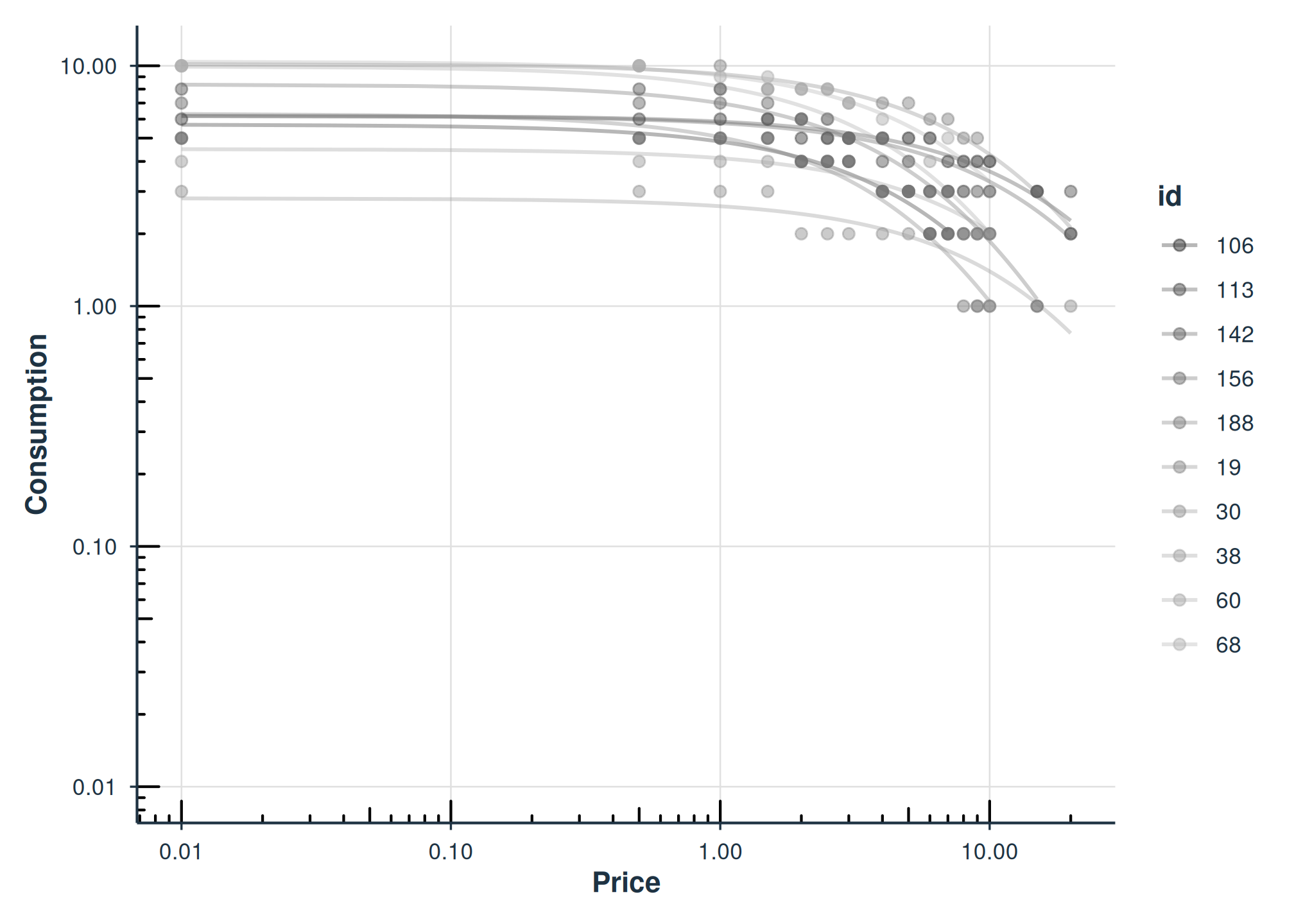
Faceted by Subject
Use facet = TRUE to show each subject in a separate
panel:
plot(fit_hs, facet = TRUE)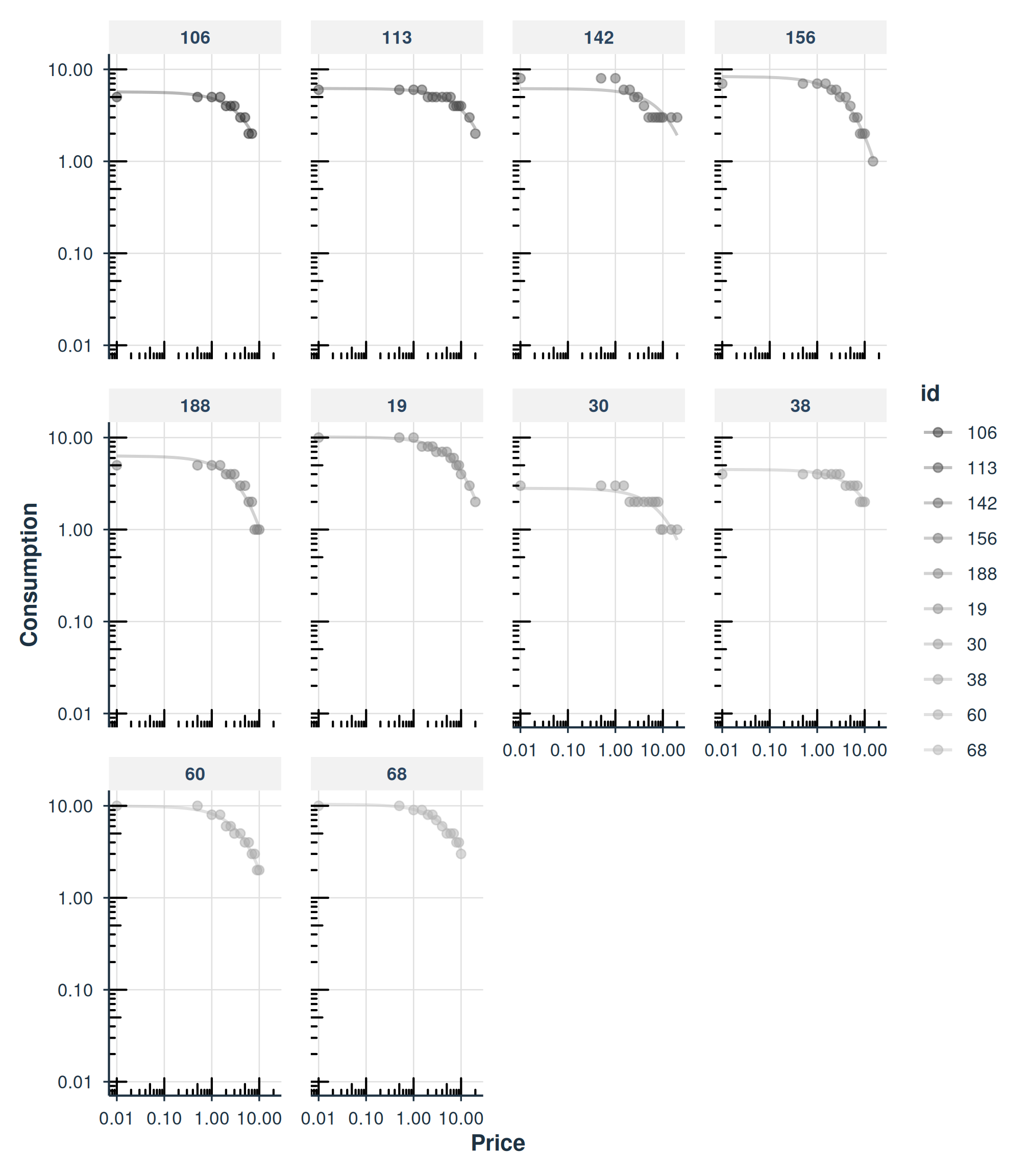
Axis Transformations
Control the x- and y-axis transformations with x_trans
and y_trans:
plot(fit_hs, x_trans = "pseudo_log", y_trans = "pseudo_log")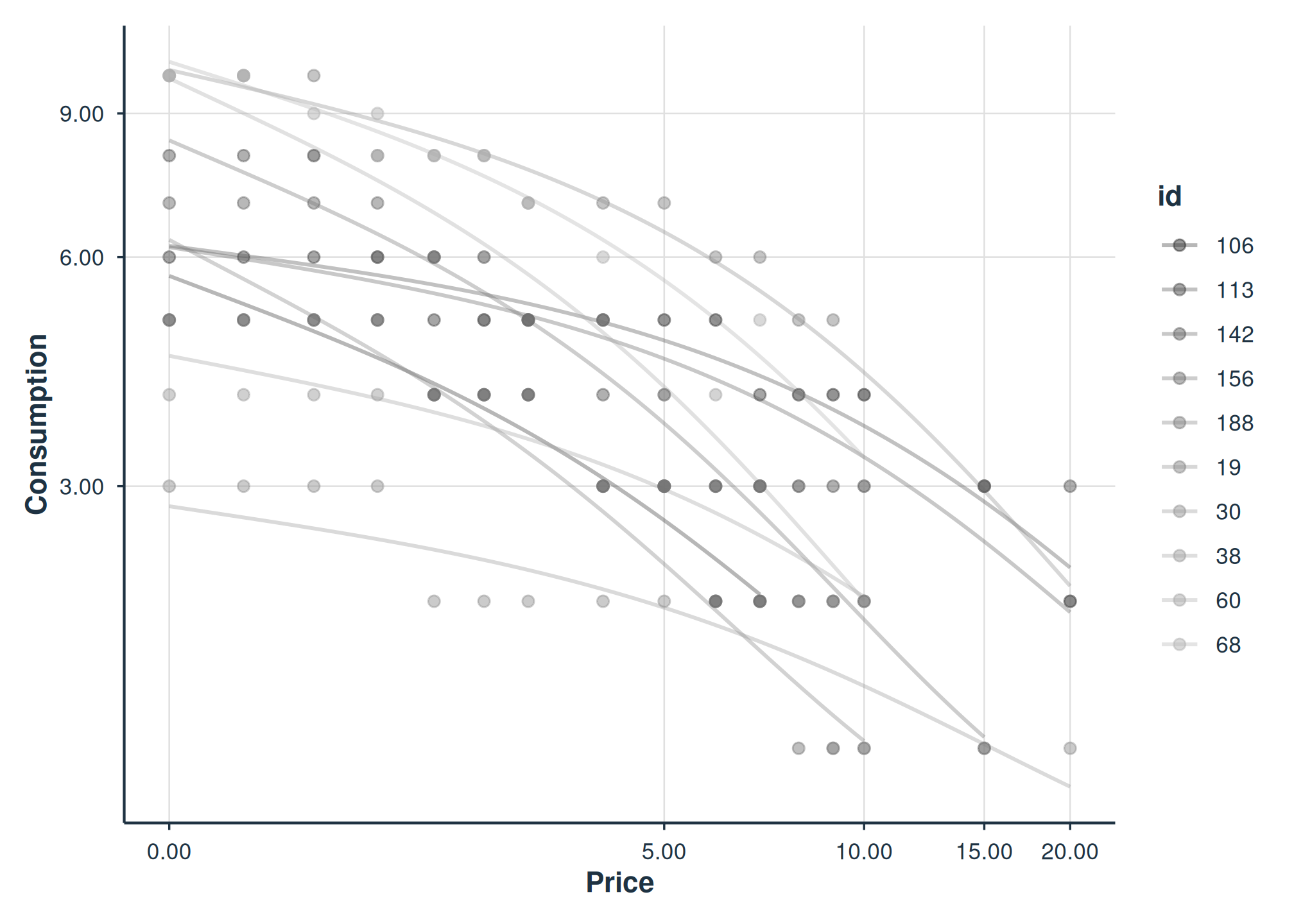
Diagnostics
Model Checks
check_demand_model() summarizes convergence, residual
properties, and potential issues:
check_demand_model(fit_hs)
#>
#> Model Diagnostics
#> ==================================================
#> Model class: beezdemand_fixed
#>
#> Convergence:
#>   Status: Converged
#>
#> Residuals:
#>   Mean: 0.0284
#>   SD: 0.5306
#>   Range: [-1.458, 2.228]
#>   Outliers: 3 observations
#>
#> --------------------------------------------------
#> Issues Detected (1):
#>   1. Detected 3 potential outliers across subjects
Residual Plots
plot_residuals() produces diagnostic plots. Use
$fitted for a residuals-vs-fitted plot:
plot_residuals(fit_hs)$fitted
#> NULL
Predictions
Default Predictions
predict() with no arguments returns fitted values at the
observed prices:
predict(fit_hs)
#> # A tibble: 160 × 3
#>        x id    .fitted
#>    <dbl> <chr>   <dbl>
#>  1     0 19      10.2
#>  2     0 30       2.81
#>  3     0 38       4.50
#>  4     0 60       9.92
#>  5     0 68      10.4
#>  6     0 106      5.68
#>  7     0 113      6.20
#>  8     0 142      6.17
#>  9     0 156      8.35
#> 10     0 188      6.30
#> # ℹ 150 more rows
Custom Price Grid
Supply newdata to predict at specific prices:
new_prices <- data.frame(x = c(0, 0.5, 1, 2, 5, 10, 20))
predict(fit_hs, newdata = new_prices)
#> # A tibble: 70 × 3
#>        x id    .fitted
#>    <dbl> <chr>   <dbl>
#>  1     0 19      10.2
#>  2     0 30       2.81
#>  3     0 38       4.50
#>  4     0 60       9.92
#>  5     0 68      10.4
#>  6     0 106      5.68
#>  7     0 113      6.20
#>  8     0 142      6.17
#>  9     0 156      8.35
#> 10     0 188      6.30
#> # ℹ 60 more rows
Aggregated Models
Instead of fitting each subject individually, you can fit a single curve to aggregated data.
Mean Aggregation
agg = "Mean" computes the mean consumption at each price
across subjects, then fits a single curve to those means:
fit_mean <- fit_demand_fixed(apt, equation = "hs", k = 2, agg = "Mean")
fit_mean
#>
#> Fixed-Effect Demand Model
#> ==========================
#>
#> Call:
#> fit_demand_fixed(data = apt, equation = "hs", k = 2, agg = "Mean")
#>
#> Equation: hs
#> k: fixed (2)
#> Aggregation: Mean
#> Subjects: 1 ( 1 converged, 0 failed)
#>
#> Use summary() for parameter summaries, tidy() for tidy output.
plot(fit_mean)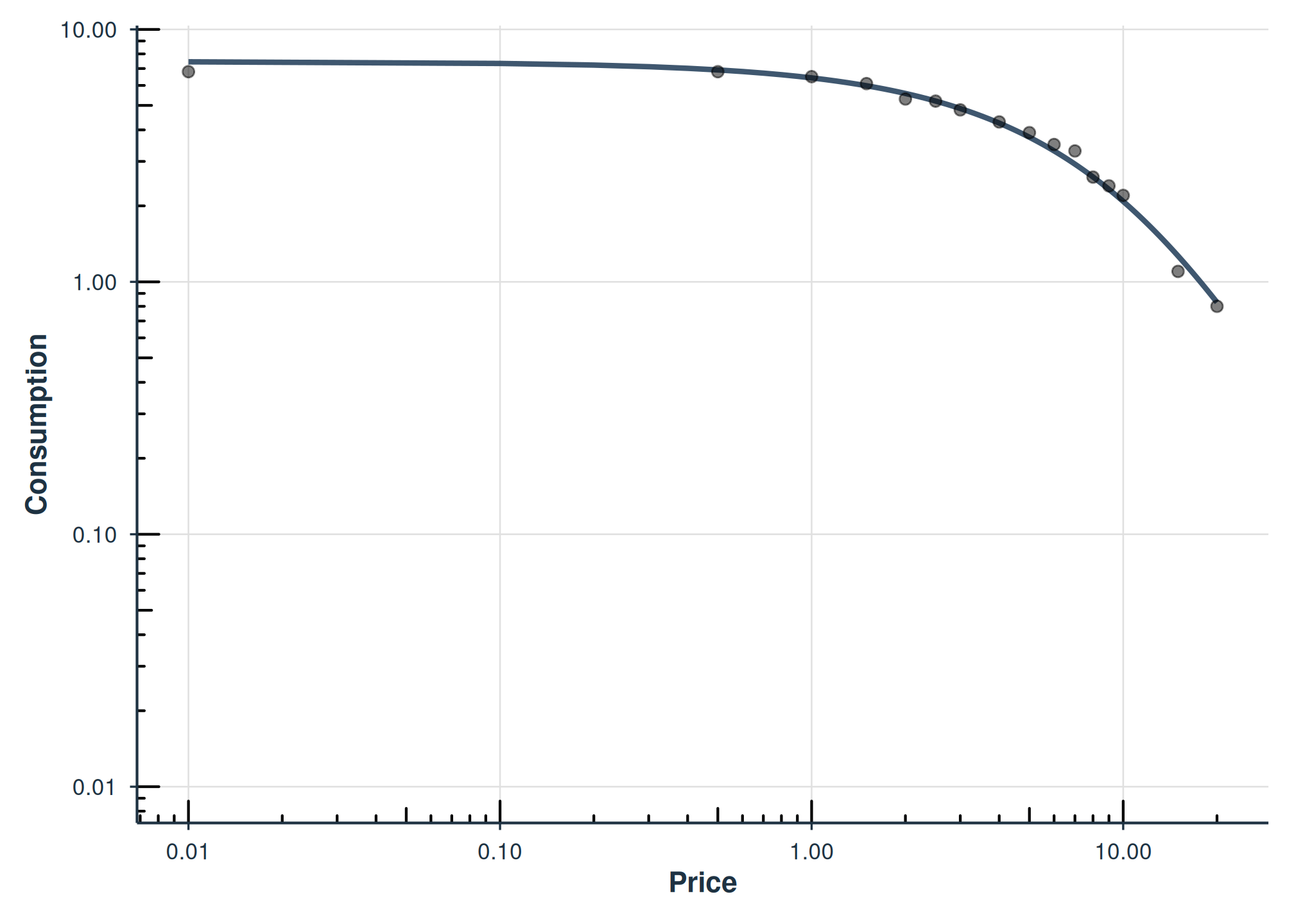
Pooled Aggregation
agg = "Pooled" fits a single curve to all data points
pooled together, retaining error around each observation but ignoring
within-subject clustering:
fit_pooled <- fit_demand_fixed(apt, equation = "hs", k = 2, agg = "Pooled")
fit_pooled
#>
#> Fixed-Effect Demand Model
#> ==========================
#>
#> Call:
#> fit_demand_fixed(data = apt, equation = "hs", k = 2, agg = "Pooled")
#>
#> Equation: hs
#> k: fixed (2)
#> Aggregation: Pooled
#> Subjects: 1 ( 1 converged, 0 failed)
#>
#> Use summary() for parameter summaries, tidy() for tidy output.
plot(fit_pooled)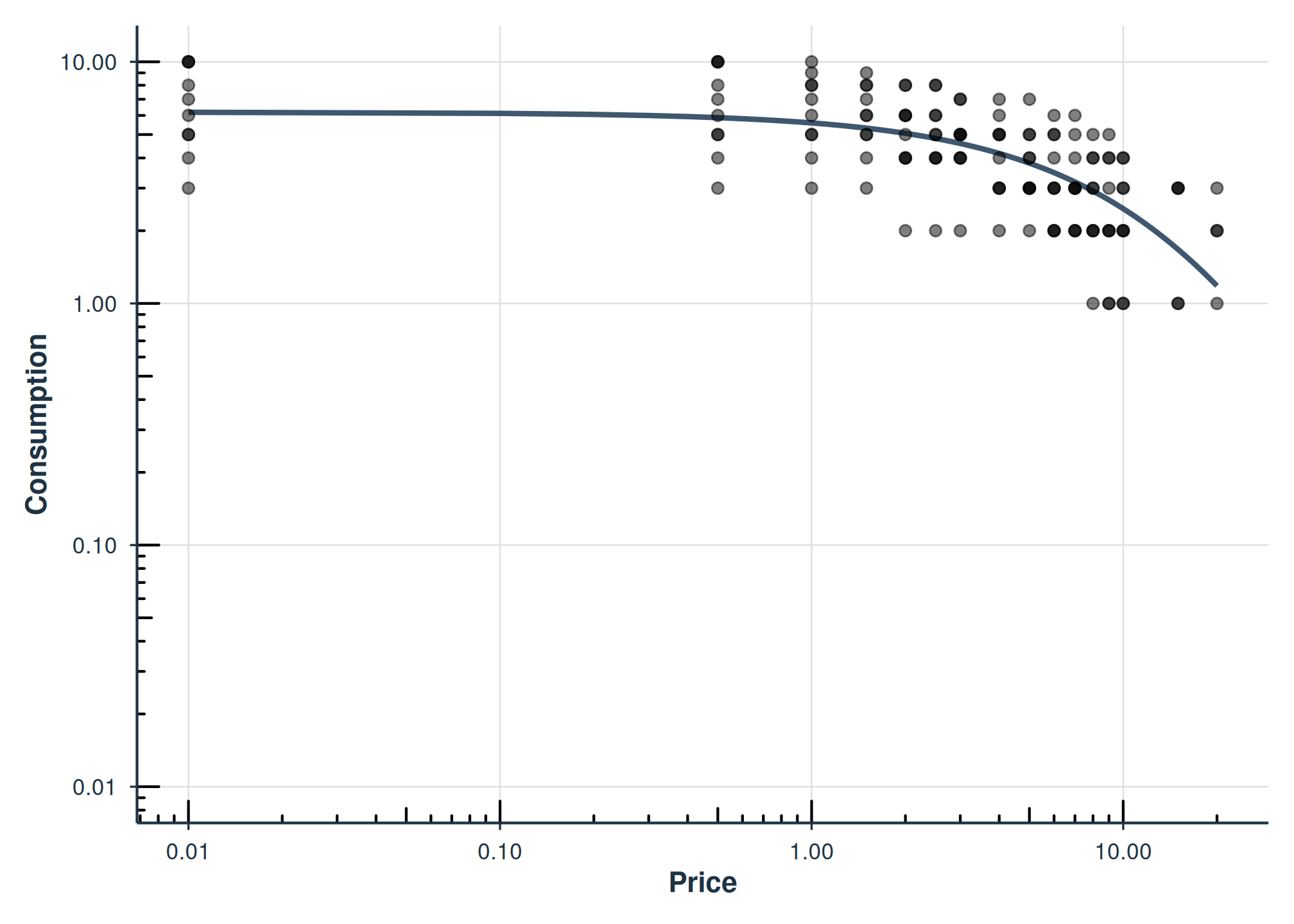
Grouped Analysis with by
When your dataset includes grouping variables (e.g., gender,
condition, drug), you can run fits separately per group using the
by parameter. This replaces manual split() /
lapply() / bind_rows() workflows.
We use the apt_full dataset, which includes demographic
columns like gender:
data("apt_full", package = "beezdemand", envir = environment())Fitting by Group
fit_by_gender <- fit_demand_fixed(
  apt_full, equation = "hs", k = 2, by = "gender"
)
#> Error in nlsModel(formula, mf, start, wts, scaleOffset = scOff, nDcentral = nDcntr) :
#>   singular gradient matrix at initial parameter estimates
#> Error in numericDeriv(form[[3L]], names(ind), env, central = nDcentral) :
#>   Missing value or an infinity produced when evaluating the model
#> Error in nls(formula = (log(y)/log(10)) ~ (log(q0)/log(10)) + k * (exp(-alpha *  :
#>   number of iterations exceeded maximum of 50
#> Error in nlsModel(formula, mf, start, wts, scaleOffset = scOff, nDcentral = nDcntr) :
#>   singular gradient matrix at initial parameter estimates
#> Error in nlsModel(formula, mf, start, wts, scaleOffset = scOff, nDcentral = nDcntr) :
#>   singular gradient matrix at initial parameter estimates
#> Error in numericDeriv(form[[3L]], names(ind), env, central = nDcentral) :
#>   Missing value or an infinity produced when evaluating the model
#> Error in nlsModel(formula, mf, start, wts, scaleOffset = scOff, nDcentral = nDcntr) :
#>   singular gradient matrix at initial parameter estimates
#> Error in numericDeriv(form[[3L]], names(ind), env, central = nDcentral) :
#>   Missing value or an infinity produced when evaluating the model
#> Error in nls(formula = (log(y)/log(10)) ~ (log(q0)/log(10)) + k * (exp(-alpha *  :
#>   number of iterations exceeded maximum of 50
#> Error in nlsModel(formula, mf, start, wts, scaleOffset = scOff, nDcentral = nDcntr) :
#>   singular gradient matrix at initial parameter estimates
#> Error in nlsModel(formula, mf, start, wts, scaleOffset = scOff, nDcentral = nDcntr) :
#>   singular gradient matrix at initial parameter estimates
#> Error in nls(formula = (log(y)/log(10)) ~ (log(q0)/log(10)) + k * (exp(-alpha *  :
#>   number of iterations exceeded maximum of 50
#> Error in nlsModel(formula, mf, start, wts, scaleOffset = scOff, nDcentral = nDcntr) :
#>   singular gradient matrix at initial parameter estimates
#> Error in numericDeriv(form[[3L]], names(ind), env, central = nDcentral) :
#>   Missing value or an infinity produced when evaluating the model
#> Error in nls(formula = (log(y)/log(10)) ~ (log(q0)/log(10)) + k * (exp(-alpha *  :
#>   number of iterations exceeded maximum of 50
#> Error in nls(formula = (log(y)/log(10)) ~ (log(q0)/log(10)) + k * (exp(-alpha *  :
#>   number of iterations exceeded maximum of 50
#> Error in numericDeriv(form[[3L]], names(ind), env, central = nDcentral) :
#>   Missing value or an infinity produced when evaluating the model
#> Error in numericDeriv(form[[3L]], names(ind), env, central = nDcentral) :
#>   Missing value or an infinity produced when evaluating the model
#> Error in numericDeriv(form[[3L]], names(ind), env, central = nDcentral) :
#>   Missing value or an infinity produced when evaluating the model
#> Error in nlsModel(formula, mf, start, wts, scaleOffset = scOff, nDcentral = nDcntr) :
#>   singular gradient matrix at initial parameter estimates
#> Error in nlsModel(formula, mf, start, wts, scaleOffset = scOff, nDcentral = nDcntr) :
#>   singular gradient matrix at initial parameter estimates
#> Error in nlsModel(formula, mf, start, wts, scaleOffset = scOff, nDcentral = nDcntr) :
#>   singular gradient matrix at initial parameter estimates
#> Error in nls(formula = (log(y)/log(10)) ~ (log(q0)/log(10)) + k * (exp(-alpha *  :
#>   number of iterations exceeded maximum of 50
#> Error in nlsModel(formula, mf, start, wts, scaleOffset = scOff, nDcentral = nDcntr) :
#>   singular gradient matrix at initial parameter estimates
#> Error in numericDeriv(form[[3L]], names(ind), env, central = nDcentral) :
#>   Missing value or an infinity produced when evaluating the model
#> Error in nls(formula = (log(y)/log(10)) ~ (log(q0)/log(10)) + k * (exp(-alpha *  :
#>   singular gradient
#> Error in nls(formula = (log(y)/log(10)) ~ (log(q0)/log(10)) + k * (exp(-alpha *  :
#>   number of iterations exceeded maximum of 50
#> Error in nls(formula = (log(y)/log(10)) ~ (log(q0)/log(10)) + k * (exp(-alpha *  :
#>   number of iterations exceeded maximum of 50
#> Error in nls(formula = (log(y)/log(10)) ~ (log(q0)/log(10)) + k * (exp(-alpha *  :
#>   step factor 0.000488281 reduced below 'minFactor' of 0.000976562
#> Error in numericDeriv(form[[3L]], names(ind), env, central = nDcentral) :
#>   Missing value or an infinity produced when evaluating the model
#> Error in nlsModel(formula, mf, start, wts, scaleOffset = scOff, nDcentral = nDcntr) :
#>   singular gradient matrix at initial parameter estimates
#> Error in numericDeriv(form[[3L]], names(ind), env, central = nDcentral) :
#>   Missing value or an infinity produced when evaluating the model
#> Error in numericDeriv(form[[3L]], names(ind), env, central = nDcentral) :
#>   Missing value or an infinity produced when evaluating the model
#> Error in nls(formula = (log(y)/log(10)) ~ (log(q0)/log(10)) + k * (exp(-alpha *  :
#>   number of iterations exceeded maximum of 50
#> Error in nlsModel(formula, mf, start, wts, scaleOffset = scOff, nDcentral = nDcntr) :
#>   singular gradient matrix at initial parameter estimates
#> Error in nls(formula = (log(y)/log(10)) ~ (log(q0)/log(10)) + k * (exp(-alpha *  :
#>   number of iterations exceeded maximum of 50
#> Error in nlsModel(formula, mf, start, wts, scaleOffset = scOff, nDcentral = nDcntr) :
#>   singular gradient matrix at initial parameter estimates
#> Error in numericDeriv(form[[3L]], names(ind), env, central = nDcentral) :
#>   Missing value or an infinity produced when evaluating the model
#> Error in nlsModel(formula, mf, start, wts, scaleOffset = scOff, nDcentral = nDcntr) :
#>   singular gradient matrix at initial parameter estimates
#> Error in numericDeriv(form[[3L]], names(ind), env, central = nDcentral) :
#>   Missing value or an infinity produced when evaluating the model
#> Error in nlsModel(formula, mf, start, wts, scaleOffset = scOff, nDcentral = nDcntr) :
#>   singular gradient matrix at initial parameter estimates
#> Error in numericDeriv(form[[3L]], names(ind), env, central = nDcentral) :
#>   Missing value or an infinity produced when evaluating the model
#> Error in numericDeriv(form[[3L]], names(ind), env, central = nDcentral) :
#>   Missing value or an infinity produced when evaluating the model
#> Error in nlsModel(formula, mf, start, wts, scaleOffset = scOff, nDcentral = nDcntr) :
#>   singular gradient matrix at initial parameter estimates
#> Error in nls(formula = (log(y)/log(10)) ~ (log(q0)/log(10)) + k * (exp(-alpha *  :
#>   number of iterations exceeded maximum of 50
#> Error in nls(formula = (log(y)/log(10)) ~ (log(q0)/log(10)) + k * (exp(-alpha *  :
#>   number of iterations exceeded maximum of 50
#> Error in nlsModel(formula, mf, start, wts, scaleOffset = scOff, nDcentral = nDcntr) :
#>   singular gradient matrix at initial parameter estimates
#> Error in nlsModel(formula, mf, start, wts, scaleOffset = scOff, nDcentral = nDcntr) :
#>   singular gradient matrix at initial parameter estimates
#> Error in nls(formula = (log(y)/log(10)) ~ (log(q0)/log(10)) + k * (exp(-alpha *  :
#>   number of iterations exceeded maximum of 50
#> Error in numericDeriv(form[[3L]], names(ind), env, central = nDcentral) :
#>   Missing value or an infinity produced when evaluating the model
#> Error in numericDeriv(form[[3L]], names(ind), env, central = nDcentral) :
#>   Missing value or an infinity produced when evaluating the model
#> Error in nlsModel(formula, mf, start, wts, scaleOffset = scOff, nDcentral = nDcntr) :
#>   singular gradient matrix at initial parameter estimates
#> Error in nlsModel(formula, mf, start, wts, scaleOffset = scOff, nDcentral = nDcntr) :
#>   singular gradient matrix at initial parameter estimates
#> Error in nls(formula = (log(y)/log(10)) ~ (log(q0)/log(10)) + k * (exp(-alpha *  :
#>   number of iterations exceeded maximum of 50
#> Error in nls(formula = (log(y)/log(10)) ~ (log(q0)/log(10)) + k * (exp(-alpha *  :
#>   number of iterations exceeded maximum of 50
#> Error in numericDeriv(form[[3L]], names(ind), env, central = nDcentral) :
#>   Missing value or an infinity produced when evaluating the model
#> Error in nls(formula = (log(y)/log(10)) ~ (log(q0)/log(10)) + k * (exp(-alpha *  :
#>   number of iterations exceeded maximum of 50
#> Error in nlsModel(formula, mf, start, wts, scaleOffset = scOff, nDcentral = nDcntr) :
#>   singular gradient matrix at initial parameter estimates
#> Error in numericDeriv(form[[3L]], names(ind), env, central = nDcentral) :
#>   Missing value or an infinity produced when evaluating the model
#> Error in nlsModel(formula, mf, start, wts, scaleOffset = scOff, nDcentral = nDcntr) :
#>   singular gradient matrix at initial parameter estimates
#> Error in nlsModel(formula, mf, start, wts, scaleOffset = scOff, nDcentral = nDcntr) :
#>   singular gradient matrix at initial parameter estimates
#> Error in nls(formula = (log(y)/log(10)) ~ (log(q0)/log(10)) + k * (exp(-alpha *  :
#>   number of iterations exceeded maximum of 50
#> Error in numericDeriv(form[[3L]], names(ind), env, central = nDcentral) :
#>   Missing value or an infinity produced when evaluating the model
#> Error in numericDeriv(form[[3L]], names(ind), env, central = nDcentral) :
#>   Missing value or an infinity produced when evaluating the model
#> Error in numericDeriv(form[[3L]], names(ind), env, central = nDcentral) :
#>   Missing value or an infinity produced when evaluating the model
#> Error in nlsModel(formula, mf, start, wts, scaleOffset = scOff, nDcentral = nDcntr) :
#>   singular gradient matrix at initial parameter estimates
#> Error in nlsModel(formula, mf, start, wts, scaleOffset = scOff, nDcentral = nDcntr) :
#>   singular gradient matrix at initial parameter estimates
#> Error in nls(formula = (log(y)/log(10)) ~ (log(q0)/log(10)) + k * (exp(-alpha *  :
#>   singular gradient
#> Error in nls(formula = (log(y)/log(10)) ~ (log(q0)/log(10)) + k * (exp(-alpha *  :
#>   singular gradient
#> Error in nlsModel(formula, mf, start, wts, scaleOffset = scOff, nDcentral = nDcntr) :
#>   singular gradient matrix at initial parameter estimates
#> Error in nls(formula = (log(y)/log(10)) ~ (log(q0)/log(10)) + k * (exp(-alpha *  :
#>   number of iterations exceeded maximum of 50
#> Error in nls(formula = (log(y)/log(10)) ~ (log(q0)/log(10)) + k * (exp(-alpha *  :
#>   step factor 0.000488281 reduced below 'minFactor' of 0.000976562
#> Error in numericDeriv(form[[3L]], names(ind), env, central = nDcentral) :
#>   Missing value or an infinity produced when evaluating the model
#> Error in nls(formula = (log(y)/log(10)) ~ (log(q0)/log(10)) + k * (exp(-alpha *  :
#>   number of iterations exceeded maximum of 50
#> Error in nlsModel(formula, mf, start, wts, scaleOffset = scOff, nDcentral = nDcntr) :
#>   singular gradient matrix at initial parameter estimates
#> Error in nls(formula = (log(y)/log(10)) ~ (log(q0)/log(10)) + k * (exp(-alpha *  :
#>   number of iterations exceeded maximum of 50
#> Error in numericDeriv(form[[3L]], names(ind), env, central = nDcentral) :
#>   Missing value or an infinity produced when evaluating the model
#> Error in numericDeriv(form[[3L]], names(ind), env, central = nDcentral) :
#>   Missing value or an infinity produced when evaluating the model
#> Error in nls(formula = (log(y)/log(10)) ~ (log(q0)/log(10)) + k * (exp(-alpha *  :
#>   number of iterations exceeded maximum of 50
#> Error in nlsModel(formula, mf, start, wts, scaleOffset = scOff, nDcentral = nDcntr) :
#>   singular gradient matrix at initial parameter estimates
#> Error in numericDeriv(form[[3L]], names(ind), env, central = nDcentral) :
#>   Missing value or an infinity produced when evaluating the model
#> Error in nlsModel(formula, mf, start, wts, scaleOffset = scOff, nDcentral = nDcntr) :
#>   singular gradient matrix at initial parameter estimates
#> Error in nls(formula = (log(y)/log(10)) ~ (log(q0)/log(10)) + k * (exp(-alpha *  :
#>   number of iterations exceeded maximum of 50
#> Error in nlsModel(formula, mf, start, wts, scaleOffset = scOff, nDcentral = nDcntr) :
#>   singular gradient matrix at initial parameter estimates
#> Error in numericDeriv(form[[3L]], names(ind), env, central = nDcentral) :
#>   Missing value or an infinity produced when evaluating the model
#> Error in nlsModel(formula, mf, start, wts, scaleOffset = scOff, nDcentral = nDcntr) :
#>   singular gradient matrix at initial parameter estimates
#> Error in numericDeriv(form[[3L]], names(ind), env, central = nDcentral) :
#>   Missing value or an infinity produced when evaluating the model
#> Error in nlsModel(formula, mf, start, wts, scaleOffset = scOff, nDcentral = nDcntr) :
#>   singular gradient matrix at initial parameter estimates
#> Error in nlsModel(formula, mf, start, wts, scaleOffset = scOff, nDcentral = nDcntr) :
#>   singular gradient matrix at initial parameter estimates
#> Error in nlsModel(formula, mf, start, wts, scaleOffset = scOff, nDcentral = nDcntr) :
#>   singular gradient matrix at initial parameter estimates
#> Error in nls(formula = (log(y)/log(10)) ~ (log(q0)/log(10)) + k * (exp(-alpha *  :
#>   number of iterations exceeded maximum of 50
#> Error in numericDeriv(form[[3L]], names(ind), env, central = nDcentral) :
#>   Missing value or an infinity produced when evaluating the model
#> Error in nlsModel(formula, mf, start, wts, scaleOffset = scOff, nDcentral = nDcntr) :
#>   singular gradient matrix at initial parameter estimates
#> Error in nls(formula = (log(y)/log(10)) ~ (log(q0)/log(10)) + k * (exp(-alpha *  :
#>   step factor 0.000488281 reduced below 'minFactor' of 0.000976562
#> Error in numericDeriv(form[[3L]], names(ind), env, central = nDcentral) :
#>   Missing value or an infinity produced when evaluating the model
#> Error in nlsModel(formula, mf, start, wts, scaleOffset = scOff, nDcentral = nDcntr) :
#>   singular gradient matrix at initial parameter estimates
#> Error in nls(formula = (log(y)/log(10)) ~ (log(q0)/log(10)) + k * (exp(-alpha *  :
#>   number of iterations exceeded maximum of 50
#> Error in numericDeriv(form[[3L]], names(ind), env, central = nDcentral) :
#>   Missing value or an infinity produced when evaluating the model
#> Error in nls(formula = (log(y)/log(10)) ~ (log(q0)/log(10)) + k * (exp(-alpha *  :
#>   singular gradient
#> Error in nlsModel(formula, mf, start, wts, scaleOffset = scOff, nDcentral = nDcntr) :
#>   singular gradient matrix at initial parameter estimates
#> Error in nlsModel(formula, mf, start, wts, scaleOffset = scOff, nDcentral = nDcntr) :
#>   singular gradient matrix at initial parameter estimates
#> Error in nlsModel(formula, mf, start, wts, scaleOffset = scOff, nDcentral = nDcntr) :
#>   singular gradient matrix at initial parameter estimates
#> Error in nls(formula = (log(y)/log(10)) ~ (log(q0)/log(10)) + k * (exp(-alpha *  :
#>   singular gradient
#> Error in nlsModel(formula, mf, start, wts, scaleOffset = scOff, nDcentral = nDcntr) :
#>   singular gradient matrix at initial parameter estimates
#> Error in nlsModel(formula, mf, start, wts, scaleOffset = scOff, nDcentral = nDcntr) :
#>   singular gradient matrix at initial parameter estimates
#> Error in nls(formula = (log(y)/log(10)) ~ (log(q0)/log(10)) + k * (exp(-alpha *  :
#>   number of iterations exceeded maximum of 50
#> Error in nls(formula = (log(y)/log(10)) ~ (log(q0)/log(10)) + k * (exp(-alpha *  :
#>   number of iterations exceeded maximum of 50
#> Error in nls(formula = (log(y)/log(10)) ~ (log(q0)/log(10)) + k * (exp(-alpha *  :
#>   number of iterations exceeded maximum of 50
#> Error in nls(formula = (log(y)/log(10)) ~ (log(q0)/log(10)) + k * (exp(-alpha *  :
#>   number of iterations exceeded maximum of 50
#> Error in nls(formula = (log(y)/log(10)) ~ (log(q0)/log(10)) + k * (exp(-alpha *  :
#>   number of iterations exceeded maximum of 50
#> Error in nls(formula = (log(y)/log(10)) ~ (log(q0)/log(10)) + k * (exp(-alpha *  :
#>   number of iterations exceeded maximum of 50
#> Error in nls(formula = (log(y)/log(10)) ~ (log(q0)/log(10)) + k * (exp(-alpha *  :
#>   number of iterations exceeded maximum of 50
#> Error in nlsModel(formula, mf, start, wts, scaleOffset = scOff, nDcentral = nDcntr) :
#>   singular gradient matrix at initial parameter estimates
#> Error in nlsModel(formula, mf, start, wts, scaleOffset = scOff, nDcentral = nDcntr) :
#>   singular gradient matrix at initial parameter estimates
#> Error in nlsModel(formula, mf, start, wts, scaleOffset = scOff, nDcentral = nDcntr) :
#>   singular gradient matrix at initial parameter estimates
#> Error in nlsModel(formula, mf, start, wts, scaleOffset = scOff, nDcentral = nDcntr) :
#>   singular gradient matrix at initial parameter estimates
#> Error in nlsModel(formula, mf, start, wts, scaleOffset = scOff, nDcentral = nDcntr) :
#>   singular gradient matrix at initial parameter estimates
#> Error in nlsModel(formula, mf, start, wts, scaleOffset = scOff, nDcentral = nDcntr) :
#>   singular gradient matrix at initial parameter estimates
#> Error in nlsModel(formula, mf, start, wts, scaleOffset = scOff, nDcentral = nDcntr) :
#>   singular gradient matrix at initial parameter estimates
#> Error in numericDeriv(form[[3L]], names(ind), env, central = nDcentral) :
#>   Missing value or an infinity produced when evaluating the model
#> Error in numericDeriv(form[[3L]], names(ind), env, central = nDcentral) :
#>   Missing value or an infinity produced when evaluating the model
#> Error in numericDeriv(form[[3L]], names(ind), env, central = nDcentral) :
#>   Missing value or an infinity produced when evaluating the model
#> Error in numericDeriv(form[[3L]], names(ind), env, central = nDcentral) :
#>   Missing value or an infinity produced when evaluating the model
#> Error in numericDeriv(form[[3L]], names(ind), env, central = nDcentral) :
#>   Missing value or an infinity produced when evaluating the model
#> Error in numericDeriv(form[[3L]], names(ind), env, central = nDcentral) :
#>   Missing value or an infinity produced when evaluating the model
#> Error in numericDeriv(form[[3L]], names(ind), env, central = nDcentral) :
#>   Missing value or an infinity produced when evaluating the model
#> Error in nls(formula = (log(y)/log(10)) ~ (log(q0)/log(10)) + k * (exp(-alpha *  :
#>   number of iterations exceeded maximum of 50
#> Error in nls(formula = (log(y)/log(10)) ~ (log(q0)/log(10)) + k * (exp(-alpha *  :
#>   number of iterations exceeded maximum of 50
#> Error in nls(formula = (log(y)/log(10)) ~ (log(q0)/log(10)) + k * (exp(-alpha *  :
#>   number of iterations exceeded maximum of 50
#> Error in nls(formula = (log(y)/log(10)) ~ (log(q0)/log(10)) + k * (exp(-alpha *  :
#>   number of iterations exceeded maximum of 50
#> Error in nls(formula = (log(y)/log(10)) ~ (log(q0)/log(10)) + k * (exp(-alpha *  :
#>   number of iterations exceeded maximum of 50
#> Error in nls(formula = (log(y)/log(10)) ~ (log(q0)/log(10)) + k * (exp(-alpha *  :
#>   number of iterations exceeded maximum of 50
#> Error in nls(formula = (log(y)/log(10)) ~ (log(q0)/log(10)) + k * (exp(-alpha *  :
#>   number of iterations exceeded maximum of 50
#> Error in nlsModel(formula, mf, start, wts, scaleOffset = scOff, nDcentral = nDcntr) :
#>   singular gradient matrix at initial parameter estimates
#> Error in nlsModel(formula, mf, start, wts, scaleOffset = scOff, nDcentral = nDcntr) :
#>   singular gradient matrix at initial parameter estimates
#> Error in nlsModel(formula, mf, start, wts, scaleOffset = scOff, nDcentral = nDcntr) :
#>   singular gradient matrix at initial parameter estimates
#> Error in nlsModel(formula, mf, start, wts, scaleOffset = scOff, nDcentral = nDcntr) :
#>   singular gradient matrix at initial parameter estimates
#> Error in nlsModel(formula, mf, start, wts, scaleOffset = scOff, nDcentral = nDcntr) :
#>   singular gradient matrix at initial parameter estimates
#> Error in nlsModel(formula, mf, start, wts, scaleOffset = scOff, nDcentral = nDcntr) :
#>   singular gradient matrix at initial parameter estimates
#> Error in nlsModel(formula, mf, start, wts, scaleOffset = scOff, nDcentral = nDcntr) :
#>   singular gradient matrix at initial parameter estimates
#> Error in nlsModel(formula, mf, start, wts, scaleOffset = scOff, nDcentral = nDcntr) :
#>   singular gradient matrix at initial parameter estimates
#> Error in nlsModel(formula, mf, start, wts, scaleOffset = scOff, nDcentral = nDcntr) :
#>   singular gradient matrix at initial parameter estimates
#> Error in nls(formula = (log(y)/log(10)) ~ (log(q0)/log(10)) + k * (exp(-alpha *  :
#>   number of iterations exceeded maximum of 50
#> Error in nls(formula = (log(y)/log(10)) ~ (log(q0)/log(10)) + k * (exp(-alpha *  :
#>   number of iterations exceeded maximum of 50
#> Error in nls(formula = (log(y)/log(10)) ~ (log(q0)/log(10)) + k * (exp(-alpha *  :
#>   number of iterations exceeded maximum of 50
#> Error in nls(formula = (log(y)/log(10)) ~ (log(q0)/log(10)) + k * (exp(-alpha *  :
#>   number of iterations exceeded maximum of 50
#> Error in nls(formula = (log(y)/log(10)) ~ (log(q0)/log(10)) + k * (exp(-alpha *  :
#>   number of iterations exceeded maximum of 50
#> Error in nls(formula = (log(y)/log(10)) ~ (log(q0)/log(10)) + k * (exp(-alpha *  :
#>   number of iterations exceeded maximum of 50
#> Error in nls(formula = (log(y)/log(10)) ~ (log(q0)/log(10)) + k * (exp(-alpha *  :
#>   number of iterations exceeded maximum of 50
#> Error in nlsModel(formula, mf, start, wts, scaleOffset = scOff, nDcentral = nDcntr) :
#>   singular gradient matrix at initial parameter estimates
#> Error in nlsModel(formula, mf, start, wts, scaleOffset = scOff, nDcentral = nDcntr) :
#>   singular gradient matrix at initial parameter estimates
#> Error in nlsModel(formula, mf, start, wts, scaleOffset = scOff, nDcentral = nDcntr) :
#>   singular gradient matrix at initial parameter estimates
#> Error in nlsModel(formula, mf, start, wts, scaleOffset = scOff, nDcentral = nDcntr) :
#>   singular gradient matrix at initial parameter estimates
#> Error in nlsModel(formula, mf, start, wts, scaleOffset = scOff, nDcentral = nDcntr) :
#>   singular gradient matrix at initial parameter estimates
#> Error in nlsModel(formula, mf, start, wts, scaleOffset = scOff, nDcentral = nDcntr) :
#>   singular gradient matrix at initial parameter estimates
#> Error in numericDeriv(form[[3L]], names(ind), env, central = nDcentral) :
#>   Missing value or an infinity produced when evaluating the model
#> Error in numericDeriv(form[[3L]], names(ind), env, central = nDcentral) :
#>   Missing value or an infinity produced when evaluating the model
#> Error in numericDeriv(form[[3L]], names(ind), env, central = nDcentral) :
#>   Missing value or an infinity produced when evaluating the model
#> Error in numericDeriv(form[[3L]], names(ind), env, central = nDcentral) :
#>   Missing value or an infinity produced when evaluating the model
#> Error in numericDeriv(form[[3L]], names(ind), env, central = nDcentral) :
#>   Missing value or an infinity produced when evaluating the model
#> Error in numericDeriv(form[[3L]], names(ind), env, central = nDcentral) :
#>   Missing value or an infinity produced when evaluating the model
#> Error in numericDeriv(form[[3L]], names(ind), env, central = nDcentral) :
#>   Missing value or an infinity produced when evaluating the model
#> Error in nls(formula = (log(y)/log(10)) ~ (log(q0)/log(10)) + k * (exp(-alpha *  :
#>   number of iterations exceeded maximum of 50
#> Error in nls(formula = (log(y)/log(10)) ~ (log(q0)/log(10)) + k * (exp(-alpha *  :
#>   number of iterations exceeded maximum of 50
#> Error in nls(formula = (log(y)/log(10)) ~ (log(q0)/log(10)) + k * (exp(-alpha *  :
#>   number of iterations exceeded maximum of 50
#> Error in nls(formula = (log(y)/log(10)) ~ (log(q0)/log(10)) + k * (exp(-alpha *  :
#>   number of iterations exceeded maximum of 50
#> Error in nls(formula = (log(y)/log(10)) ~ (log(q0)/log(10)) + k * (exp(-alpha *  :
#>   number of iterations exceeded maximum of 50
#> Error in nls(formula = (log(y)/log(10)) ~ (log(q0)/log(10)) + k * (exp(-alpha *  :
#>   number of iterations exceeded maximum of 50
#> Error in nls(formula = (log(y)/log(10)) ~ (log(q0)/log(10)) + k * (exp(-alpha *  :
#>   number of iterations exceeded maximum of 50
#> Error in nls(formula = (log(y)/log(10)) ~ (log(q0)/log(10)) + k * (exp(-alpha *  :
#>   number of iterations exceeded maximum of 50
#> Error in nls(formula = (log(y)/log(10)) ~ (log(q0)/log(10)) + k * (exp(-alpha *  :
#>   number of iterations exceeded maximum of 50
#> Error in nls(formula = (log(y)/log(10)) ~ (log(q0)/log(10)) + k * (exp(-alpha *  :
#>   number of iterations exceeded maximum of 50
#> Error in nls(formula = (log(y)/log(10)) ~ (log(q0)/log(10)) + k * (exp(-alpha *  :
#>   number of iterations exceeded maximum of 50
#> Error in nls(formula = (log(y)/log(10)) ~ (log(q0)/log(10)) + k * (exp(-alpha *  :
#>   number of iterations exceeded maximum of 50
#> Error in nls(formula = (log(y)/log(10)) ~ (log(q0)/log(10)) + k * (exp(-alpha *  :
#>   number of iterations exceeded maximum of 50
#> Error in nls(formula = (log(y)/log(10)) ~ (log(q0)/log(10)) + k * (exp(-alpha *  :
#>   number of iterations exceeded maximum of 50
#> Error in numericDeriv(form[[3L]], names(ind), env, central = nDcentral) :
#>   Missing value or an infinity produced when evaluating the model
#> Error in numericDeriv(form[[3L]], names(ind), env, central = nDcentral) :
#>   Missing value or an infinity produced when evaluating the model
#> Error in numericDeriv(form[[3L]], names(ind), env, central = nDcentral) :
#>   Missing value or an infinity produced when evaluating the model
#> Error in numericDeriv(form[[3L]], names(ind), env, central = nDcentral) :
#>   Missing value or an infinity produced when evaluating the model
#> Error in numericDeriv(form[[3L]], names(ind), env, central = nDcentral) :
#>   Missing value or an infinity produced when evaluating the model
#> Error in numericDeriv(form[[3L]], names(ind), env, central = nDcentral) :
#>   Missing value or an infinity produced when evaluating the model
#> Error in numericDeriv(form[[3L]], names(ind), env, central = nDcentral) :
#>   Missing value or an infinity produced when evaluating the model
#> Error in numericDeriv(form[[3L]], names(ind), env, central = nDcentral) :
#>   Missing value or an infinity produced when evaluating the model
#> Error in numericDeriv(form[[3L]], names(ind), env, central = nDcentral) :
#>   Missing value or an infinity produced when evaluating the model
#> Error in numericDeriv(form[[3L]], names(ind), env, central = nDcentral) :
#>   Missing value or an infinity produced when evaluating the model
#> Error in numericDeriv(form[[3L]], names(ind), env, central = nDcentral) :
#>   Missing value or an infinity produced when evaluating the model
#> Error in numericDeriv(form[[3L]], names(ind), env, central = nDcentral) :
#>   Missing value or an infinity produced when evaluating the model
#> Error in numericDeriv(form[[3L]], names(ind), env, central = nDcentral) :
#>   Missing value or an infinity produced when evaluating the model
#> Error in numericDeriv(form[[3L]], names(ind), env, central = nDcentral) :
#>   Missing value or an infinity produced when evaluating the model
#> Error in nlsModel(formula, mf, start, wts, scaleOffset = scOff, nDcentral = nDcntr) :
#>   singular gradient matrix at initial parameter estimates
#> Error in nlsModel(formula, mf, start, wts, scaleOffset = scOff, nDcentral = nDcntr) :
#>   singular gradient matrix at initial parameter estimates
#> Error in nlsModel(formula, mf, start, wts, scaleOffset = scOff, nDcentral = nDcntr) :
#>   singular gradient matrix at initial parameter estimates
#> Error in nlsModel(formula, mf, start, wts, scaleOffset = scOff, nDcentral = nDcntr) :
#>   singular gradient matrix at initial parameter estimates
#> Error in nlsModel(formula, mf, start, wts, scaleOffset = scOff, nDcentral = nDcntr) :
#>   singular gradient matrix at initial parameter estimates
#> Error in nlsModel(formula, mf, start, wts, scaleOffset = scOff, nDcentral = nDcntr) :
#>   singular gradient matrix at initial parameter estimates
#> Error in nlsModel(formula, mf, start, wts, scaleOffset = scOff, nDcentral = nDcntr) :
#>   singular gradient matrix at initial parameter estimates
#> Error in nlsModel(formula, mf, start, wts, scaleOffset = scOff, nDcentral = nDcntr) :
#>   singular gradient matrix at initial parameter estimates
#> Error in nlsModel(formula, mf, start, wts, scaleOffset = scOff, nDcentral = nDcntr) :
#>   singular gradient matrix at initial parameter estimates
#> Error in nls(formula = (log(y)/log(10)) ~ (log(q0)/log(10)) + k * (exp(-alpha *  :
#>   number of iterations exceeded maximum of 50
#> Error in nls(formula = (log(y)/log(10)) ~ (log(q0)/log(10)) + k * (exp(-alpha *  :
#>   number of iterations exceeded maximum of 50
#> Error in nls(formula = (log(y)/log(10)) ~ (log(q0)/log(10)) + k * (exp(-alpha *  :
#>   number of iterations exceeded maximum of 50
#> Error in nls(formula = (log(y)/log(10)) ~ (log(q0)/log(10)) + k * (exp(-alpha *  :
#>   number of iterations exceeded maximum of 50
#> Error in nls(formula = (log(y)/log(10)) ~ (log(q0)/log(10)) + k * (exp(-alpha *  :
#>   number of iterations exceeded maximum of 50
#> Error in nls(formula = (log(y)/log(10)) ~ (log(q0)/log(10)) + k * (exp(-alpha *  :
#>   number of iterations exceeded maximum of 50
#> Error in nls(formula = (log(y)/log(10)) ~ (log(q0)/log(10)) + k * (exp(-alpha *  :
#>   number of iterations exceeded maximum of 50
#> Error in nlsModel(formula, mf, start, wts, scaleOffset = scOff, nDcentral = nDcntr) :
#>   singular gradient matrix at initial parameter estimates
#> Error in nls(formula = (log(y)/log(10)) ~ (log(q0)/log(10)) + k * (exp(-alpha *  :
#>   singular gradient
#> Error in nlsModel(formula, mf, start, wts, scaleOffset = scOff, nDcentral = nDcntr) :
#>   singular gradient matrix at initial parameter estimates
#> Error in nlsModel(formula, mf, start, wts, scaleOffset = scOff, nDcentral = nDcntr) :
#>   singular gradient matrix at initial parameter estimates
#> Error in nlsModel(formula, mf, start, wts, scaleOffset = scOff, nDcentral = nDcntr) :
#>   singular gradient matrix at initial parameter estimates
#> Error in nls(formula = (log(y)/log(10)) ~ (log(q0)/log(10)) + k * (exp(-alpha *  :
#>   singular gradient
#> Error in nls(formula = (log(y)/log(10)) ~ (log(q0)/log(10)) + k * (exp(-alpha *  :
#>   singular gradient
#> Error in nls(formula = (log(y)/log(10)) ~ (log(q0)/log(10)) + k * (exp(-alpha *  :
#>   singular gradient
#> Error in nls(formula = (log(y)/log(10)) ~ (log(q0)/log(10)) + k * (exp(-alpha *  :
#>   number of iterations exceeded maximum of 50
#> Error in nls(formula = (log(y)/log(10)) ~ (log(q0)/log(10)) + k * (exp(-alpha *  :
#>   number of iterations exceeded maximum of 50
#> Error in nls(formula = (log(y)/log(10)) ~ (log(q0)/log(10)) + k * (exp(-alpha *  :
#>   number of iterations exceeded maximum of 50
#> Error in nls(formula = (log(y)/log(10)) ~ (log(q0)/log(10)) + k * (exp(-alpha *  :
#>   number of iterations exceeded maximum of 50
#> Error in nls(formula = (log(y)/log(10)) ~ (log(q0)/log(10)) + k * (exp(-alpha *  :
#>   number of iterations exceeded maximum of 50
#> Error in nls(formula = (log(y)/log(10)) ~ (log(q0)/log(10)) + k * (exp(-alpha *  :
#>   number of iterations exceeded maximum of 50
#> Error in nls(formula = (log(y)/log(10)) ~ (log(q0)/log(10)) + k * (exp(-alpha *  :
#>   number of iterations exceeded maximum of 50
#> Error in nls(formula = (log(y)/log(10)) ~ (log(q0)/log(10)) + k * (exp(-alpha *  :
#>   number of iterations exceeded maximum of 50
#> Error in nls(formula = (log(y)/log(10)) ~ (log(q0)/log(10)) + k * (exp(-alpha *  :
#>   number of iterations exceeded maximum of 50
#> Error in nls(formula = (log(y)/log(10)) ~ (log(q0)/log(10)) + k * (exp(-alpha *  :
#>   number of iterations exceeded maximum of 50
#> Error in nls(formula = (log(y)/log(10)) ~ (log(q0)/log(10)) + k * (exp(-alpha *  :
#>   number of iterations exceeded maximum of 50
#> Error in nls(formula = (log(y)/log(10)) ~ (log(q0)/log(10)) + k * (exp(-alpha *  :
#>   number of iterations exceeded maximum of 50
#> Error in nls(formula = (log(y)/log(10)) ~ (log(q0)/log(10)) + k * (exp(-alpha *  :
#>   number of iterations exceeded maximum of 50
#> Error in nls(formula = (log(y)/log(10)) ~ (log(q0)/log(10)) + k * (exp(-alpha *  :
#>   number of iterations exceeded maximum of 50
#> Error in nls(formula = (log(y)/log(10)) ~ (log(q0)/log(10)) + k * (exp(-alpha *  :
#>   step factor 0.000488281 reduced below 'minFactor' of 0.000976562
#> Error in nls(formula = (log(y)/log(10)) ~ (log(q0)/log(10)) + k * (exp(-alpha *  :
#>   step factor 0.000488281 reduced below 'minFactor' of 0.000976562
#> Error in nls(formula = (log(y)/log(10)) ~ (log(q0)/log(10)) + k * (exp(-alpha *  :
#>   step factor 0.000488281 reduced below 'minFactor' of 0.000976562
#> Error in nls(formula = (log(y)/log(10)) ~ (log(q0)/log(10)) + k * (exp(-alpha *  :
#>   step factor 0.000488281 reduced below 'minFactor' of 0.000976562
#> Error in numericDeriv(form[[3L]], names(ind), env, central = nDcentral) :
#>   Missing value or an infinity produced when evaluating the model
#> Error in numericDeriv(form[[3L]], names(ind), env, central = nDcentral) :
#>   Missing value or an infinity produced when evaluating the model
#> Error in numericDeriv(form[[3L]], names(ind), env, central = nDcentral) :
#>   Missing value or an infinity produced when evaluating the model
#> Error in numericDeriv(form[[3L]], names(ind), env, central = nDcentral) :
#>   Missing value or an infinity produced when evaluating the model
#> Error in numericDeriv(form[[3L]], names(ind), env, central = nDcentral) :
#>   Missing value or an infinity produced when evaluating the model
#> Error in numericDeriv(form[[3L]], names(ind), env, central = nDcentral) :
#>   Missing value or an infinity produced when evaluating the model
#> Error in numericDeriv(form[[3L]], names(ind), env, central = nDcentral) :
#>   Missing value or an infinity produced when evaluating the model
#> Error in nlsModel(formula, mf, start, wts, scaleOffset = scOff, nDcentral = nDcntr) :
#>   singular gradient matrix at initial parameter estimates
#> Error in nlsModel(formula, mf, start, wts, scaleOffset = scOff, nDcentral = nDcntr) :
#>   singular gradient matrix at initial parameter estimates
#> Error in nlsModel(formula, mf, start, wts, scaleOffset = scOff, nDcentral = nDcntr) :
#>   singular gradient matrix at initial parameter estimates
#> Error in nlsModel(formula, mf, start, wts, scaleOffset = scOff, nDcentral = nDcntr) :
#>   singular gradient matrix at initial parameter estimates
#> Error in nlsModel(formula, mf, start, wts, scaleOffset = scOff, nDcentral = nDcntr) :
#>   singular gradient matrix at initial parameter estimates
#> Error in numericDeriv(form[[3L]], names(ind), env, central = nDcentral) :
#>   Missing value or an infinity produced when evaluating the model
#> Error in numericDeriv(form[[3L]], names(ind), env, central = nDcentral) :
#>   Missing value or an infinity produced when evaluating the model
#> Error in numericDeriv(form[[3L]], names(ind), env, central = nDcentral) :
#>   Missing value or an infinity produced when evaluating the model
#> Error in numericDeriv(form[[3L]], names(ind), env, central = nDcentral) :
#>   Missing value or an infinity produced when evaluating the model
#> Error in numericDeriv(form[[3L]], names(ind), env, central = nDcentral) :
#>   Missing value or an infinity produced when evaluating the model
#> Error in numericDeriv(form[[3L]], names(ind), env, central = nDcentral) :
#>   Missing value or an infinity produced when evaluating the model
#> Error in numericDeriv(form[[3L]], names(ind), env, central = nDcentral) :
#>   Missing value or an infinity produced when evaluating the model
#> Error in numericDeriv(form[[3L]], names(ind), env, central = nDcentral) :
#>   Missing value or an infinity produced when evaluating the model
#> Error in numericDeriv(form[[3L]], names(ind), env, central = nDcentral) :
#>   Missing value or an infinity produced when evaluating the model
#> Error in numericDeriv(form[[3L]], names(ind), env, central = nDcentral) :
#>   Missing value or an infinity produced when evaluating the model
#> Error in numericDeriv(form[[3L]], names(ind), env, central = nDcentral) :
#>   Missing value or an infinity produced when evaluating the model
#> Error in numericDeriv(form[[3L]], names(ind), env, central = nDcentral) :
#>   Missing value or an infinity produced when evaluating the model
#> Error in numericDeriv(form[[3L]], names(ind), env, central = nDcentral) :
#>   Missing value or an infinity produced when evaluating the model
#> Error in numericDeriv(form[[3L]], names(ind), env, central = nDcentral) :
#>   Missing value or an infinity produced when evaluating the model
#> Error in nls(formula = (log(y)/log(10)) ~ (log(q0)/log(10)) + k * (exp(-alpha *  :
#>   number of iterations exceeded maximum of 50
#> Error in nls(formula = (log(y)/log(10)) ~ (log(q0)/log(10)) + k * (exp(-alpha *  :
#>   number of iterations exceeded maximum of 50
#> Error in nls(formula = (log(y)/log(10)) ~ (log(q0)/log(10)) + k * (exp(-alpha *  :
#>   number of iterations exceeded maximum of 50
#> Error in nls(formula = (log(y)/log(10)) ~ (log(q0)/log(10)) + k * (exp(-alpha *  :
#>   number of iterations exceeded maximum of 50
#> Error in nls(formula = (log(y)/log(10)) ~ (log(q0)/log(10)) + k * (exp(-alpha *  :
#>   number of iterations exceeded maximum of 50
#> Error in nls(formula = (log(y)/log(10)) ~ (log(q0)/log(10)) + k * (exp(-alpha *  :
#>   number of iterations exceeded maximum of 50
#> Error in nls(formula = (log(y)/log(10)) ~ (log(q0)/log(10)) + k * (exp(-alpha *  :
#>   number of iterations exceeded maximum of 50
#> Error in nlsModel(formula, mf, start, wts, scaleOffset = scOff, nDcentral = nDcntr) :
#>   singular gradient matrix at initial parameter estimates
#> Error in nlsModel(formula, mf, start, wts, scaleOffset = scOff, nDcentral = nDcntr) :
#>   singular gradient matrix at initial parameter estimates
#> Error in nlsModel(formula, mf, start, wts, scaleOffset = scOff, nDcentral = nDcntr) :
#>   singular gradient matrix at initial parameter estimates
#> Error in nlsModel(formula, mf, start, wts, scaleOffset = scOff, nDcentral = nDcntr) :
#>   singular gradient matrix at initial parameter estimates
#> Error in nls(formula = (log(y)/log(10)) ~ (log(q0)/log(10)) + k * (exp(-alpha *  :
#>   number of iterations exceeded maximum of 50
#> Error in nls(formula = (log(y)/log(10)) ~ (log(q0)/log(10)) + k * (exp(-alpha *  :
#>   number of iterations exceeded maximum of 50
#> Error in nls(formula = (log(y)/log(10)) ~ (log(q0)/log(10)) + k * (exp(-alpha *  :
#>   number of iterations exceeded maximum of 50
#> Error in nls(formula = (log(y)/log(10)) ~ (log(q0)/log(10)) + k * (exp(-alpha *  :
#>   number of iterations exceeded maximum of 50
#> Error in nls(formula = (log(y)/log(10)) ~ (log(q0)/log(10)) + k * (exp(-alpha *  :
#>   number of iterations exceeded maximum of 50
#> Error in nls(formula = (log(y)/log(10)) ~ (log(q0)/log(10)) + k * (exp(-alpha *  :
#>   number of iterations exceeded maximum of 50
#> Error in nls(formula = (log(y)/log(10)) ~ (log(q0)/log(10)) + k * (exp(-alpha *  :
#>   number of iterations exceeded maximum of 50
#> Error in nlsModel(formula, mf, start, wts, scaleOffset = scOff, nDcentral = nDcntr) :
#>   singular gradient matrix at initial parameter estimates
#> Error in nlsModel(formula, mf, start, wts, scaleOffset = scOff, nDcentral = nDcntr) :
#>   singular gradient matrix at initial parameter estimates
#> Error in nlsModel(formula, mf, start, wts, scaleOffset = scOff, nDcentral = nDcntr) :
#>   singular gradient matrix at initial parameter estimates
#> Error in nlsModel(formula, mf, start, wts, scaleOffset = scOff, nDcentral = nDcntr) :
#>   singular gradient matrix at initial parameter estimates
#> Error in nlsModel(formula, mf, start, wts, scaleOffset = scOff, nDcentral = nDcntr) :
#>   singular gradient matrix at initial parameter estimates
#> Error in numericDeriv(form[[3L]], names(ind), env, central = nDcentral) :
#>   Missing value or an infinity produced when evaluating the model
#> Error in numericDeriv(form[[3L]], names(ind), env, central = nDcentral) :
#>   Missing value or an infinity produced when evaluating the model
#> Error in numericDeriv(form[[3L]], names(ind), env, central = nDcentral) :
#>   Missing value or an infinity produced when evaluating the model
#> Error in numericDeriv(form[[3L]], names(ind), env, central = nDcentral) :
#>   Missing value or an infinity produced when evaluating the model
#> Error in numericDeriv(form[[3L]], names(ind), env, central = nDcentral) :
#>   Missing value or an infinity produced when evaluating the model
#> Error in numericDeriv(form[[3L]], names(ind), env, central = nDcentral) :
#>   Missing value or an infinity produced when evaluating the model
#> Error in numericDeriv(form[[3L]], names(ind), env, central = nDcentral) :
#>   Missing value or an infinity produced when evaluating the model
#> Error in nlsModel(formula, mf, start, wts, scaleOffset = scOff, nDcentral = nDcntr) :
#>   singular gradient matrix at initial parameter estimates
#> Error in nlsModel(formula, mf, start, wts, scaleOffset = scOff, nDcentral = nDcntr) :
#>   singular gradient matrix at initial parameter estimates
#> Error in nlsModel(formula, mf, start, wts, scaleOffset = scOff, nDcentral = nDcntr) :
#>   singular gradient matrix at initial parameter estimates
#> Error in nlsModel(formula, mf, start, wts, scaleOffset = scOff, nDcentral = nDcntr) :
#>   singular gradient matrix at initial parameter estimates
#> Error in nlsModel(formula, mf, start, wts, scaleOffset = scOff, nDcentral = nDcntr) :
#>   singular gradient matrix at initial parameter estimates
#> Error in numericDeriv(form[[3L]], names(ind), env, central = nDcentral) :
#>   Missing value or an infinity produced when evaluating the model
#> Error in numericDeriv(form[[3L]], names(ind), env, central = nDcentral) :
#>   Missing value or an infinity produced when evaluating the model
#> Error in numericDeriv(form[[3L]], names(ind), env, central = nDcentral) :
#>   Missing value or an infinity produced when evaluating the model
#> Error in numericDeriv(form[[3L]], names(ind), env, central = nDcentral) :
#>   Missing value or an infinity produced when evaluating the model
#> Error in numericDeriv(form[[3L]], names(ind), env, central = nDcentral) :
#>   Missing value or an infinity produced when evaluating the model
#> Error in numericDeriv(form[[3L]], names(ind), env, central = nDcentral) :
#>   Missing value or an infinity produced when evaluating the model
#> Error in numericDeriv(form[[3L]], names(ind), env, central = nDcentral) :
#>   Missing value or an infinity produced when evaluating the model
#> Error in nlsModel(formula, mf, start, wts, scaleOffset = scOff, nDcentral = nDcntr) :
#>   singular gradient matrix at initial parameter estimates
#> Error in nlsModel(formula, mf, start, wts, scaleOffset = scOff, nDcentral = nDcntr) :
#>   singular gradient matrix at initial parameter estimates
#> Error in nlsModel(formula, mf, start, wts, scaleOffset = scOff, nDcentral = nDcntr) :
#>   singular gradient matrix at initial parameter estimates
#> Error in nls(formula = (log(y)/log(10)) ~ (log(q0)/log(10)) + k * (exp(-alpha *  :
#>   number of iterations exceeded maximum of 50
#> Error in nls(formula = (log(y)/log(10)) ~ (log(q0)/log(10)) + k * (exp(-alpha *  :
#>   number of iterations exceeded maximum of 50
#> Error in nls(formula = (log(y)/log(10)) ~ (log(q0)/log(10)) + k * (exp(-alpha *  :
#>   number of iterations exceeded maximum of 50
#> Error in nls(formula = (log(y)/log(10)) ~ (log(q0)/log(10)) + k * (exp(-alpha *  :
#>   number of iterations exceeded maximum of 50
#> Error in nls(formula = (log(y)/log(10)) ~ (log(q0)/log(10)) + k * (exp(-alpha *  :
#>   number of iterations exceeded maximum of 50
#> Error in nls(formula = (log(y)/log(10)) ~ (log(q0)/log(10)) + k * (exp(-alpha *  :
#>   number of iterations exceeded maximum of 50
#> Error in nls(formula = (log(y)/log(10)) ~ (log(q0)/log(10)) + k * (exp(-alpha *  :
#>   number of iterations exceeded maximum of 50
#> Error in nls(formula = (log(y)/log(10)) ~ (log(q0)/log(10)) + k * (exp(-alpha *  :
#>   number of iterations exceeded maximum of 50
#> Error in nls(formula = (log(y)/log(10)) ~ (log(q0)/log(10)) + k * (exp(-alpha *  :
#>   number of iterations exceeded maximum of 50
#> Error in nls(formula = (log(y)/log(10)) ~ (log(q0)/log(10)) + k * (exp(-alpha *  :
#>   number of iterations exceeded maximum of 50
#> Error in nls(formula = (log(y)/log(10)) ~ (log(q0)/log(10)) + k * (exp(-alpha *  :
#>   number of iterations exceeded maximum of 50
#> Error in nls(formula = (log(y)/log(10)) ~ (log(q0)/log(10)) + k * (exp(-alpha *  :
#>   number of iterations exceeded maximum of 50
#> Error in nls(formula = (log(y)/log(10)) ~ (log(q0)/log(10)) + k * (exp(-alpha *  :
#>   number of iterations exceeded maximum of 50
#> Error in nls(formula = (log(y)/log(10)) ~ (log(q0)/log(10)) + k * (exp(-alpha *  :
#>   number of iterations exceeded maximum of 50
#> Error in nlsModel(formula, mf, start, wts, scaleOffset = scOff, nDcentral = nDcntr) :
#>   singular gradient matrix at initial parameter estimates
#> Error in nlsModel(formula, mf, start, wts, scaleOffset = scOff, nDcentral = nDcntr) :
#>   singular gradient matrix at initial parameter estimates
#> Error in nlsModel(formula, mf, start, wts, scaleOffset = scOff, nDcentral = nDcntr) :
#>   singular gradient matrix at initial parameter estimates
#> Error in nlsModel(formula, mf, start, wts, scaleOffset = scOff, nDcentral = nDcntr) :
#>   singular gradient matrix at initial parameter estimates
#> Error in nlsModel(formula, mf, start, wts, scaleOffset = scOff, nDcentral = nDcntr) :
#>   singular gradient matrix at initial parameter estimates
#> Error in nlsModel(formula, mf, start, wts, scaleOffset = scOff, nDcentral = nDcntr) :
#>   singular gradient matrix at initial parameter estimates
#> Error in nls(formula = (log(y)/log(10)) ~ (log(q0)/log(10)) + k * (exp(-alpha *  :
#>   number of iterations exceeded maximum of 50
#> Error in nls(formula = (log(y)/log(10)) ~ (log(q0)/log(10)) + k * (exp(-alpha *  :
#>   number of iterations exceeded maximum of 50
#> Error in nls(formula = (log(y)/log(10)) ~ (log(q0)/log(10)) + k * (exp(-alpha *  :
#>   number of iterations exceeded maximum of 50
#> Error in nls(formula = (log(y)/log(10)) ~ (log(q0)/log(10)) + k * (exp(-alpha *  :
#>   number of iterations exceeded maximum of 50
#> Error in nls(formula = (log(y)/log(10)) ~ (log(q0)/log(10)) + k * (exp(-alpha *  :
#>   number of iterations exceeded maximum of 50
#> Error in nls(formula = (log(y)/log(10)) ~ (log(q0)/log(10)) + k * (exp(-alpha *  :
#>   number of iterations exceeded maximum of 50
#> Error in nls(formula = (log(y)/log(10)) ~ (log(q0)/log(10)) + k * (exp(-alpha *  :
#>   number of iterations exceeded maximum of 50
#> Error in numericDeriv(form[[3L]], names(ind), env, central = nDcentral) :
#>   Missing value or an infinity produced when evaluating the model
#> Error in numericDeriv(form[[3L]], names(ind), env, central = nDcentral) :
#>   Missing value or an infinity produced when evaluating the model
#> Error in numericDeriv(form[[3L]], names(ind), env, central = nDcentral) :
#>   Missing value or an infinity produced when evaluating the model
#> Error in numericDeriv(form[[3L]], names(ind), env, central = nDcentral) :
#>   Missing value or an infinity produced when evaluating the model
#> Error in numericDeriv(form[[3L]], names(ind), env, central = nDcentral) :
#>   Missing value or an infinity produced when evaluating the model
#> Error in numericDeriv(form[[3L]], names(ind), env, central = nDcentral) :
#>   Missing value or an infinity produced when evaluating the model
#> Error in numericDeriv(form[[3L]], names(ind), env, central = nDcentral) :
#>   Missing value or an infinity produced when evaluating the model
#> Error in numericDeriv(form[[3L]], names(ind), env, central = nDcentral) :
#>   Missing value or an infinity produced when evaluating the model
#> Error in numericDeriv(form[[3L]], names(ind), env, central = nDcentral) :
#>   Missing value or an infinity produced when evaluating the model
#> Error in numericDeriv(form[[3L]], names(ind), env, central = nDcentral) :
#>   Missing value or an infinity produced when evaluating the model
#> Error in numericDeriv(form[[3L]], names(ind), env, central = nDcentral) :
#>   Missing value or an infinity produced when evaluating the model
#> Error in numericDeriv(form[[3L]], names(ind), env, central = nDcentral) :
#>   Missing value or an infinity produced when evaluating the model
#> Error in numericDeriv(form[[3L]], names(ind), env, central = nDcentral) :
#>   Missing value or an infinity produced when evaluating the model
#> Error in numericDeriv(form[[3L]], names(ind), env, central = nDcentral) :
#>   Missing value or an infinity produced when evaluating the model
#> Error in nlsModel(formula, mf, start, wts, scaleOffset = scOff, nDcentral = nDcntr) :
#>   singular gradient matrix at initial parameter estimates
#> Error in nlsModel(formula, mf, start, wts, scaleOffset = scOff, nDcentral = nDcntr) :
#>   singular gradient matrix at initial parameter estimates
#> Error in nlsModel(formula, mf, start, wts, scaleOffset = scOff, nDcentral = nDcntr) :
#>   singular gradient matrix at initial parameter estimates
#> Error in nlsModel(formula, mf, start, wts, scaleOffset = scOff, nDcentral = nDcntr) :
#>   singular gradient matrix at initial parameter estimates
#> Error in nlsModel(formula, mf, start, wts, scaleOffset = scOff, nDcentral = nDcntr) :
#>   singular gradient matrix at initial parameter estimates
#> Error in nlsModel(formula, mf, start, wts, scaleOffset = scOff, nDcentral = nDcntr) :
#>   singular gradient matrix at initial parameter estimates
#> Error in nlsModel(formula, mf, start, wts, scaleOffset = scOff, nDcentral = nDcntr) :
#>   singular gradient matrix at initial parameter estimates
#> Error in nlsModel(formula, mf, start, wts, scaleOffset = scOff, nDcentral = nDcntr) :
#>   singular gradient matrix at initial parameter estimates
#> Error in nls(formula = (log(y)/log(10)) ~ (log(q0)/log(10)) + k * (exp(-alpha *  :
#>   number of iterations exceeded maximum of 50
#> Error in nls(formula = (log(y)/log(10)) ~ (log(q0)/log(10)) + k * (exp(-alpha *  :
#>   number of iterations exceeded maximum of 50
#> Error in nls(formula = (log(y)/log(10)) ~ (log(q0)/log(10)) + k * (exp(-alpha *  :
#>   number of iterations exceeded maximum of 50
#> Error in nls(formula = (log(y)/log(10)) ~ (log(q0)/log(10)) + k * (exp(-alpha *  :
#>   number of iterations exceeded maximum of 50
#> Error in nls(formula = (log(y)/log(10)) ~ (log(q0)/log(10)) + k * (exp(-alpha *  :
#>   number of iterations exceeded maximum of 50
#> Error in nls(formula = (log(y)/log(10)) ~ (log(q0)/log(10)) + k * (exp(-alpha *  :
#>   number of iterations exceeded maximum of 50
#> Error in nls(formula = (log(y)/log(10)) ~ (log(q0)/log(10)) + k * (exp(-alpha *  :
#>   number of iterations exceeded maximum of 50
#> Error in nls(formula = (log(y)/log(10)) ~ (log(q0)/log(10)) + k * (exp(-alpha *  :
#>   number of iterations exceeded maximum of 50
#> Error in nls(formula = (log(y)/log(10)) ~ (log(q0)/log(10)) + k * (exp(-alpha *  :
#>   number of iterations exceeded maximum of 50
#> Error in nls(formula = (log(y)/log(10)) ~ (log(q0)/log(10)) + k * (exp(-alpha *  :
#>   number of iterations exceeded maximum of 50
#> Error in nls(formula = (log(y)/log(10)) ~ (log(q0)/log(10)) + k * (exp(-alpha *  :
#>   number of iterations exceeded maximum of 50
#> Error in nls(formula = (log(y)/log(10)) ~ (log(q0)/log(10)) + k * (exp(-alpha *  :
#>   number of iterations exceeded maximum of 50
#> Error in nls(formula = (log(y)/log(10)) ~ (log(q0)/log(10)) + k * (exp(-alpha *  :
#>   number of iterations exceeded maximum of 50
#> Error in nls(formula = (log(y)/log(10)) ~ (log(q0)/log(10)) + k * (exp(-alpha *  :
#>   number of iterations exceeded maximum of 50
#> Error in nls(formula = (log(y)/log(10)) ~ (log(q0)/log(10)) + k * (exp(-alpha *  :
#>   number of iterations exceeded maximum of 50
#> Error in nls(formula = (log(y)/log(10)) ~ (log(q0)/log(10)) + k * (exp(-alpha *  :
#>   number of iterations exceeded maximum of 50
#> Error in nls(formula = (log(y)/log(10)) ~ (log(q0)/log(10)) + k * (exp(-alpha *  :
#>   number of iterations exceeded maximum of 50
#> Error in nls(formula = (log(y)/log(10)) ~ (log(q0)/log(10)) + k * (exp(-alpha *  :
#>   number of iterations exceeded maximum of 50
#> Error in nls(formula = (log(y)/log(10)) ~ (log(q0)/log(10)) + k * (exp(-alpha *  :
#>   number of iterations exceeded maximum of 50
#> Error in nls(formula = (log(y)/log(10)) ~ (log(q0)/log(10)) + k * (exp(-alpha *  :
#>   number of iterations exceeded maximum of 50
#> Error in nls(formula = (log(y)/log(10)) ~ (log(q0)/log(10)) + k * (exp(-alpha *  :
#>   number of iterations exceeded maximum of 50
#> Error in nlsModel(formula, mf, start, wts, scaleOffset = scOff, nDcentral = nDcntr) :
#>   singular gradient matrix at initial parameter estimates
#> Error in nlsModel(formula, mf, start, wts, scaleOffset = scOff, nDcentral = nDcntr) :
#>   singular gradient matrix at initial parameter estimates
#> Error in nlsModel(formula, mf, start, wts, scaleOffset = scOff, nDcentral = nDcntr) :
#>   singular gradient matrix at initial parameter estimates
#> Error in nlsModel(formula, mf, start, wts, scaleOffset = scOff, nDcentral = nDcntr) :
#>   singular gradient matrix at initial parameter estimates
#> Error in nlsModel(formula, mf, start, wts, scaleOffset = scOff, nDcentral = nDcntr) :
#>   singular gradient matrix at initial parameter estimates
#> Error in nlsModel(formula, mf, start, wts, scaleOffset = scOff, nDcentral = nDcntr) :
#>   singular gradient matrix at initial parameter estimates
#> Error in nls(formula = (log(y)/log(10)) ~ (log(q0)/log(10)) + k * (exp(-alpha *  :
#>   singular gradient
#> Error in nlsModel(formula, mf, start, wts, scaleOffset = scOff, nDcentral = nDcntr) :
#>   singular gradient matrix at initial parameter estimates
#> Error in nlsModel(formula, mf, start, wts, scaleOffset = scOff, nDcentral = nDcntr) :
#>   singular gradient matrix at initial parameter estimates
#> Error in nls(formula = (log(y)/log(10)) ~ (log(q0)/log(10)) + k * (exp(-alpha *  :
#>   singular gradient
#> Error in nlsModel(formula, mf, start, wts, scaleOffset = scOff, nDcentral = nDcntr) :
#>   singular gradient matrix at initial parameter estimates
#> Error in nlsModel(formula, mf, start, wts, scaleOffset = scOff, nDcentral = nDcntr) :
#>   singular gradient matrix at initial parameter estimates
#> Error in nlsModel(formula, mf, start, wts, scaleOffset = scOff, nDcentral = nDcntr) :
#>   singular gradient matrix at initial parameter estimates
#> Error in nls(formula = (log(y)/log(10)) ~ (log(q0)/log(10)) + k * (exp(-alpha *  :
#>   number of iterations exceeded maximum of 50
#> Error in nls(formula = (log(y)/log(10)) ~ (log(q0)/log(10)) + k * (exp(-alpha *  :
#>   number of iterations exceeded maximum of 50
#> Error in nls(formula = (log(y)/log(10)) ~ (log(q0)/log(10)) + k * (exp(-alpha *  :
#>   number of iterations exceeded maximum of 50
#> Error in nls(formula = (log(y)/log(10)) ~ (log(q0)/log(10)) + k * (exp(-alpha *  :
#>   number of iterations exceeded maximum of 50
#> Error in nls(formula = (log(y)/log(10)) ~ (log(q0)/log(10)) + k * (exp(-alpha *  :
#>   number of iterations exceeded maximum of 50
#> Error in nls(formula = (log(y)/log(10)) ~ (log(q0)/log(10)) + k * (exp(-alpha *  :
#>   number of iterations exceeded maximum of 50
#> Error in nls(formula = (log(y)/log(10)) ~ (log(q0)/log(10)) + k * (exp(-alpha *  :
#>   number of iterations exceeded maximum of 50
#> Error in numericDeriv(form[[3L]], names(ind), env, central = nDcentral) :
#>   Missing value or an infinity produced when evaluating the model
#> Error in numericDeriv(form[[3L]], names(ind), env, central = nDcentral) :
#>   Missing value or an infinity produced when evaluating the model
#> Error in numericDeriv(form[[3L]], names(ind), env, central = nDcentral) :
#>   Missing value or an infinity produced when evaluating the model
#> Error in numericDeriv(form[[3L]], names(ind), env, central = nDcentral) :
#>   Missing value or an infinity produced when evaluating the model
#> Error in numericDeriv(form[[3L]], names(ind), env, central = nDcentral) :
#>   Missing value or an infinity produced when evaluating the model
#> Error in numericDeriv(form[[3L]], names(ind), env, central = nDcentral) :
#>   Missing value or an infinity produced when evaluating the model
#> Error in numericDeriv(form[[3L]], names(ind), env, central = nDcentral) :
#>   Missing value or an infinity produced when evaluating the model
#> Error in numericDeriv(form[[3L]], names(ind), env, central = nDcentral) :
#>   Missing value or an infinity produced when evaluating the model
#> Error in numericDeriv(form[[3L]], names(ind), env, central = nDcentral) :
#>   Missing value or an infinity produced when evaluating the model
#> Error in numericDeriv(form[[3L]], names(ind), env, central = nDcentral) :
#>   Missing value or an infinity produced when evaluating the model
#> Error in numericDeriv(form[[3L]], names(ind), env, central = nDcentral) :
#>   Missing value or an infinity produced when evaluating the model
#> Error in numericDeriv(form[[3L]], names(ind), env, central = nDcentral) :
#>   Missing value or an infinity produced when evaluating the model
#> Error in numericDeriv(form[[3L]], names(ind), env, central = nDcentral) :
#>   Missing value or an infinity produced when evaluating the model
#> Error in numericDeriv(form[[3L]], names(ind), env, central = nDcentral) :
#>   Missing value or an infinity produced when evaluating the model
#> Error in nlsModel(formula, mf, start, wts, scaleOffset = scOff, nDcentral = nDcntr) :
#>   singular gradient matrix at initial parameter estimates
#> Error in nlsModel(formula, mf, start, wts, scaleOffset = scOff, nDcentral = nDcntr) :
#>   singular gradient matrix at initial parameter estimates
#> Error in nlsModel(formula, mf, start, wts, scaleOffset = scOff, nDcentral = nDcntr) :
#>   singular gradient matrix at initial parameter estimates
#> Error in nlsModel(formula, mf, start, wts, scaleOffset = scOff, nDcentral = nDcntr) :
#>   singular gradient matrix at initial parameter estimates
#> Error in nlsModel(formula, mf, start, wts, scaleOffset = scOff, nDcentral = nDcntr) :
#>   singular gradient matrix at initial parameter estimates
#> Error in nlsModel(formula, mf, start, wts, scaleOffset = scOff, nDcentral = nDcntr) :
#>   singular gradient matrix at initial parameter estimates
#> Error in nlsModel(formula, mf, start, wts, scaleOffset = scOff, nDcentral = nDcntr) :
#>   singular gradient matrix at initial parameter estimates
#> Error in nlsModel(formula, mf, start, wts, scaleOffset = scOff, nDcentral = nDcntr) :
#>   singular gradient matrix at initial parameter estimates
#> Error in nlsModel(formula, mf, start, wts, scaleOffset = scOff, nDcentral = nDcntr) :
#>   singular gradient matrix at initial parameter estimates
#> Error in nlsModel(formula, mf, start, wts, scaleOffset = scOff, nDcentral = nDcntr) :
#>   singular gradient matrix at initial parameter estimates
#> Error in nls(formula = (log(y)/log(10)) ~ (log(q0)/log(10)) + k * (exp(-alpha *  :
#>   singular gradient
#> Error in nls(formula = (log(y)/log(10)) ~ (log(q0)/log(10)) + k * (exp(-alpha *  :
#>   singular gradient
#> Error in nlsModel(formula, mf, start, wts, scaleOffset = scOff, nDcentral = nDcntr) :
#>   singular gradient matrix at initial parameter estimates
#> Error in nlsModel(formula, mf, start, wts, scaleOffset = scOff, nDcentral = nDcntr) :
#>   singular gradient matrix at initial parameter estimates
#> Error in nls(formula = (log(y)/log(10)) ~ (log(q0)/log(10)) + k * (exp(-alpha *  :
#>   singular gradient
#> Error in nlsModel(formula, mf, start, wts, scaleOffset = scOff, nDcentral = nDcntr) :
#>   singular gradient matrix at initial parameter estimates
#> Error in nls(formula = (log(y)/log(10)) ~ (log(q0)/log(10)) + k * (exp(-alpha *  :
#>   singular gradient
#> Error in nls(formula = (log(y)/log(10)) ~ (log(q0)/log(10)) + k * (exp(-alpha *  :
#>   singular gradient
#> Error in nlsModel(formula, mf, start, wts, scaleOffset = scOff, nDcentral = nDcntr) :
#>   singular gradient matrix at initial parameter estimates
#> Error in nls(formula = (log(y)/log(10)) ~ (log(q0)/log(10)) + k * (exp(-alpha *  :
#>   singular gradient
#> Error in nls(formula = (log(y)/log(10)) ~ (log(q0)/log(10)) + k * (exp(-alpha *  :
#>   singular gradient
#> Error in nls(formula = (log(y)/log(10)) ~ (log(q0)/log(10)) + k * (exp(-alpha *  :
#>   singular gradient
#> Error in nls(formula = (log(y)/log(10)) ~ (log(q0)/log(10)) + k * (exp(-alpha *  :
#>   singular gradient
#> Error in nlsModel(formula, mf, start, wts, scaleOffset = scOff, nDcentral = nDcntr) :
#>   singular gradient matrix at initial parameter estimates
#> Error in nlsModel(formula, mf, start, wts, scaleOffset = scOff, nDcentral = nDcntr) :
#>   singular gradient matrix at initial parameter estimates
#> Error in nlsModel(formula, mf, start, wts, scaleOffset = scOff, nDcentral = nDcntr) :
#>   singular gradient matrix at initial parameter estimates
#> Error in nls(formula = (log(y)/log(10)) ~ (log(q0)/log(10)) + k * (exp(-alpha *  :
#>   number of iterations exceeded maximum of 50
#> Error in nls(formula = (log(y)/log(10)) ~ (log(q0)/log(10)) + k * (exp(-alpha *  :
#>   number of iterations exceeded maximum of 50
#> Error in nls(formula = (log(y)/log(10)) ~ (log(q0)/log(10)) + k * (exp(-alpha *  :
#>   number of iterations exceeded maximum of 50
#> Error in nls(formula = (log(y)/log(10)) ~ (log(q0)/log(10)) + k * (exp(-alpha *  :
#>   number of iterations exceeded maximum of 50
#> Error in nls(formula = (log(y)/log(10)) ~ (log(q0)/log(10)) + k * (exp(-alpha *  :
#>   number of iterations exceeded maximum of 50
#> Error in nls(formula = (log(y)/log(10)) ~ (log(q0)/log(10)) + k * (exp(-alpha *  :
#>   number of iterations exceeded maximum of 50
#> Error in nls(formula = (log(y)/log(10)) ~ (log(q0)/log(10)) + k * (exp(-alpha *  :
#>   number of iterations exceeded maximum of 50
#> Error in nls(formula = (log(y)/log(10)) ~ (log(q0)/log(10)) + k * (exp(-alpha *  :
#>   step factor 0.000488281 reduced below 'minFactor' of 0.000976562
#> Error in nls(formula = (log(y)/log(10)) ~ (log(q0)/log(10)) + k * (exp(-alpha *  :
#>   step factor 0.000488281 reduced below 'minFactor' of 0.000976562
#> Error in nls(formula = (log(y)/log(10)) ~ (log(q0)/log(10)) + k * (exp(-alpha *  :
#>   step factor 0.000488281 reduced below 'minFactor' of 0.000976562
#> Error in nls(formula = (log(y)/log(10)) ~ (log(q0)/log(10)) + k * (exp(-alpha *  :
#>   step factor 0.000488281 reduced below 'minFactor' of 0.000976562
#> Error in nls(formula = (log(y)/log(10)) ~ (log(q0)/log(10)) + k * (exp(-alpha *  :
#>   step factor 0.000488281 reduced below 'minFactor' of 0.000976562
#> Error in nls(formula = (log(y)/log(10)) ~ (log(q0)/log(10)) + k * (exp(-alpha *  :
#>   step factor 0.000488281 reduced below 'minFactor' of 0.000976562
#> Error in nls(formula = (log(y)/log(10)) ~ (log(q0)/log(10)) + k * (exp(-alpha *  :
#>   number of iterations exceeded maximum of 50
#> Error in nls(formula = (log(y)/log(10)) ~ (log(q0)/log(10)) + k * (exp(-alpha *  :
#>   number of iterations exceeded maximum of 50
#> Error in nls(formula = (log(y)/log(10)) ~ (log(q0)/log(10)) + k * (exp(-alpha *  :
#>   number of iterations exceeded maximum of 50
#> Error in nls(formula = (log(y)/log(10)) ~ (log(q0)/log(10)) + k * (exp(-alpha *  :
#>   number of iterations exceeded maximum of 50
#> Error in nls(formula = (log(y)/log(10)) ~ (log(q0)/log(10)) + k * (exp(-alpha *  :
#>   number of iterations exceeded maximum of 50
#> Error in nls(formula = (log(y)/log(10)) ~ (log(q0)/log(10)) + k * (exp(-alpha *  :
#>   number of iterations exceeded maximum of 50
#> Error in nls(formula = (log(y)/log(10)) ~ (log(q0)/log(10)) + k * (exp(-alpha *  :
#>   number of iterations exceeded maximum of 50
#> Error in nlsModel(formula, mf, start, wts, scaleOffset = scOff, nDcentral = nDcntr) :
#>   singular gradient matrix at initial parameter estimates
#> Error in nlsModel(formula, mf, start, wts, scaleOffset = scOff, nDcentral = nDcntr) :
#>   singular gradient matrix at initial parameter estimates
#> Error in nlsModel(formula, mf, start, wts, scaleOffset = scOff, nDcentral = nDcntr) :
#>   singular gradient matrix at initial parameter estimates
#> Error in nlsModel(formula, mf, start, wts, scaleOffset = scOff, nDcentral = nDcntr) :
#>   singular gradient matrix at initial parameter estimates
#> Error in nls(formula = (log(y)/log(10)) ~ (log(q0)/log(10)) + k * (exp(-alpha *  :
#>   number of iterations exceeded maximum of 50
#> Error in nls(formula = (log(y)/log(10)) ~ (log(q0)/log(10)) + k * (exp(-alpha *  :
#>   number of iterations exceeded maximum of 50
#> Error in nls(formula = (log(y)/log(10)) ~ (log(q0)/log(10)) + k * (exp(-alpha *  :
#>   number of iterations exceeded maximum of 50
#> Error in nls(formula = (log(y)/log(10)) ~ (log(q0)/log(10)) + k * (exp(-alpha *  :
#>   number of iterations exceeded maximum of 50
#> Error in nls(formula = (log(y)/log(10)) ~ (log(q0)/log(10)) + k * (exp(-alpha *  :
#>   number of iterations exceeded maximum of 50
#> Error in nls(formula = (log(y)/log(10)) ~ (log(q0)/log(10)) + k * (exp(-alpha *  :
#>   number of iterations exceeded maximum of 50
#> Error in nls(formula = (log(y)/log(10)) ~ (log(q0)/log(10)) + k * (exp(-alpha *  :
#>   number of iterations exceeded maximum of 50
#> Error in nls(formula = (log(y)/log(10)) ~ (log(q0)/log(10)) + k * (exp(-alpha *  :
#>   number of iterations exceeded maximum of 50
#> Error in nls(formula = (log(y)/log(10)) ~ (log(q0)/log(10)) + k * (exp(-alpha *  :
#>   number of iterations exceeded maximum of 50
#> Error in nls(formula = (log(y)/log(10)) ~ (log(q0)/log(10)) + k * (exp(-alpha *  :
#>   number of iterations exceeded maximum of 50
#> Error in nls(formula = (log(y)/log(10)) ~ (log(q0)/log(10)) + k * (exp(-alpha *  :
#>   number of iterations exceeded maximum of 50
#> Error in nls(formula = (log(y)/log(10)) ~ (log(q0)/log(10)) + k * (exp(-alpha *  :
#>   number of iterations exceeded maximum of 50
#> Error in nls(formula = (log(y)/log(10)) ~ (log(q0)/log(10)) + k * (exp(-alpha *  :
#>   number of iterations exceeded maximum of 50
#> Error in nls(formula = (log(y)/log(10)) ~ (log(q0)/log(10)) + k * (exp(-alpha *  :
#>   number of iterations exceeded maximum of 50
#> Error in nlsModel(formula, mf, start, wts, scaleOffset = scOff, nDcentral = nDcntr) :
#>   singular gradient matrix at initial parameter estimates
#> Error in nlsModel(formula, mf, start, wts, scaleOffset = scOff, nDcentral = nDcntr) :
#>   singular gradient matrix at initial parameter estimates
#> Error in nlsModel(formula, mf, start, wts, scaleOffset = scOff, nDcentral = nDcntr) :
#>   singular gradient matrix at initial parameter estimates
#> Error in nlsModel(formula, mf, start, wts, scaleOffset = scOff, nDcentral = nDcntr) :
#>   singular gradient matrix at initial parameter estimates
#> Error in nlsModel(formula, mf, start, wts, scaleOffset = scOff, nDcentral = nDcntr) :
#>   singular gradient matrix at initial parameter estimates
#> Error in numericDeriv(form[[3L]], names(ind), env, central = nDcentral) :
#>   Missing value or an infinity produced when evaluating the model
#> Error in numericDeriv(form[[3L]], names(ind), env, central = nDcentral) :
#>   Missing value or an infinity produced when evaluating the model
#> Error in numericDeriv(form[[3L]], names(ind), env, central = nDcentral) :
#>   Missing value or an infinity produced when evaluating the model
#> Error in numericDeriv(form[[3L]], names(ind), env, central = nDcentral) :
#>   Missing value or an infinity produced when evaluating the model
#> Error in numericDeriv(form[[3L]], names(ind), env, central = nDcentral) :
#>   Missing value or an infinity produced when evaluating the model
#> Error in numericDeriv(form[[3L]], names(ind), env, central = nDcentral) :
#>   Missing value or an infinity produced when evaluating the model
#> Error in numericDeriv(form[[3L]], names(ind), env, central = nDcentral) :
#>   Missing value or an infinity produced when evaluating the model
#> Error in nlsModel(formula, mf, start, wts, scaleOffset = scOff, nDcentral = nDcntr) :
#>   singular gradient matrix at initial parameter estimates
#> Error in nlsModel(formula, mf, start, wts, scaleOffset = scOff, nDcentral = nDcntr) :
#>   singular gradient matrix at initial parameter estimates
#> Error in nlsModel(formula, mf, start, wts, scaleOffset = scOff, nDcentral = nDcntr) :
#>   singular gradient matrix at initial parameter estimates
#> Error in nls(formula = (log(y)/log(10)) ~ (log(q0)/log(10)) + k * (exp(-alpha *  :
#>   number of iterations exceeded maximum of 50
#> Error in nls(formula = (log(y)/log(10)) ~ (log(q0)/log(10)) + k * (exp(-alpha *  :
#>   number of iterations exceeded maximum of 50
#> Error in nls(formula = (log(y)/log(10)) ~ (log(q0)/log(10)) + k * (exp(-alpha *  :
#>   number of iterations exceeded maximum of 50
#> Error in nls(formula = (log(y)/log(10)) ~ (log(q0)/log(10)) + k * (exp(-alpha *  :
#>   number of iterations exceeded maximum of 50
#> Error in nls(formula = (log(y)/log(10)) ~ (log(q0)/log(10)) + k * (exp(-alpha *  :
#>   number of iterations exceeded maximum of 50
#> Error in nls(formula = (log(y)/log(10)) ~ (log(q0)/log(10)) + k * (exp(-alpha *  :
#>   number of iterations exceeded maximum of 50
#> Error in nls(formula = (log(y)/log(10)) ~ (log(q0)/log(10)) + k * (exp(-alpha *  :
#>   number of iterations exceeded maximum of 50
#> Error in nlsModel(formula, mf, start, wts, scaleOffset = scOff, nDcentral = nDcntr) :
#>   singular gradient matrix at initial parameter estimates
#> Error in nlsModel(formula, mf, start, wts, scaleOffset = scOff, nDcentral = nDcntr) :
#>   singular gradient matrix at initial parameter estimates
#> Error in nlsModel(formula, mf, start, wts, scaleOffset = scOff, nDcentral = nDcntr) :
#>   singular gradient matrix at initial parameter estimates
#> Error in nlsModel(formula, mf, start, wts, scaleOffset = scOff, nDcentral = nDcntr) :
#>   singular gradient matrix at initial parameter estimates
#> Error in nlsModel(formula, mf, start, wts, scaleOffset = scOff, nDcentral = nDcntr) :
#>   singular gradient matrix at initial parameter estimates
#> Error in nlsModel(formula, mf, start, wts, scaleOffset = scOff, nDcentral = nDcntr) :
#>   singular gradient matrix at initial parameter estimates
#> Error in nlsModel(formula, mf, start, wts, scaleOffset = scOff, nDcentral = nDcntr) :
#>   singular gradient matrix at initial parameter estimates
#> Error in nls(formula = (log(y)/log(10)) ~ (log(q0)/log(10)) + k * (exp(-alpha *  :
#>   singular gradient
#> Error in nlsModel(formula, mf, start, wts, scaleOffset = scOff, nDcentral = nDcntr) :
#>   singular gradient matrix at initial parameter estimates
#> Error in nlsModel(formula, mf, start, wts, scaleOffset = scOff, nDcentral = nDcntr) :
#>   singular gradient matrix at initial parameter estimates
#> Error in nlsModel(formula, mf, start, wts, scaleOffset = scOff, nDcentral = nDcntr) :
#>   singular gradient matrix at initial parameter estimates
#> Error in nls(formula = (log(y)/log(10)) ~ (log(q0)/log(10)) + k * (exp(-alpha *  :
#>   singular gradient
#> Error in nls(formula = (log(y)/log(10)) ~ (log(q0)/log(10)) + k * (exp(-alpha *  :
#>   singular gradient
#> Error in nlsModel(formula, mf, start, wts, scaleOffset = scOff, nDcentral = nDcntr) :
#>   singular gradient matrix at initial parameter estimates
#> Error in nlsModel(formula, mf, start, wts, scaleOffset = scOff, nDcentral = nDcntr) :
#>   singular gradient matrix at initial parameter estimates
#> Error in nlsModel(formula, mf, start, wts, scaleOffset = scOff, nDcentral = nDcntr) :
#>   singular gradient matrix at initial parameter estimates
#> Error in nlsModel(formula, mf, start, wts, scaleOffset = scOff, nDcentral = nDcntr) :
#>   singular gradient matrix at initial parameter estimates
#> Error in nlsModel(formula, mf, start, wts, scaleOffset = scOff, nDcentral = nDcntr) :
#>   singular gradient matrix at initial parameter estimates
#> Error in nlsModel(formula, mf, start, wts, scaleOffset = scOff, nDcentral = nDcntr) :
#>   singular gradient matrix at initial parameter estimates
#> Error in nlsModel(formula, mf, start, wts, scaleOffset = scOff, nDcentral = nDcntr) :
#>   singular gradient matrix at initial parameter estimates
#> Error in nls(formula = (log(y)/log(10)) ~ (log(q0)/log(10)) + k * (exp(-alpha *  :
#>   singular gradient
#> Error in nls(formula = (log(y)/log(10)) ~ (log(q0)/log(10)) + k * (exp(-alpha *  :
#>   singular gradient
#> Error in nlsModel(formula, mf, start, wts, scaleOffset = scOff, nDcentral = nDcntr) :
#>   singular gradient matrix at initial parameter estimates
#> Error in nls(formula = (log(y)/log(10)) ~ (log(q0)/log(10)) + k * (exp(-alpha *  :
#>   number of iterations exceeded maximum of 50
#> Error in nls(formula = (log(y)/log(10)) ~ (log(q0)/log(10)) + k * (exp(-alpha *  :
#>   number of iterations exceeded maximum of 50
#> Error in nls(formula = (log(y)/log(10)) ~ (log(q0)/log(10)) + k * (exp(-alpha *  :
#>   number of iterations exceeded maximum of 50
#> Error in nls(formula = (log(y)/log(10)) ~ (log(q0)/log(10)) + k * (exp(-alpha *  :
#>   number of iterations exceeded maximum of 50
#> Error in nls(formula = (log(y)/log(10)) ~ (log(q0)/log(10)) + k * (exp(-alpha *  :
#>   number of iterations exceeded maximum of 50
#> Error in nls(formula = (log(y)/log(10)) ~ (log(q0)/log(10)) + k * (exp(-alpha *  :
#>   number of iterations exceeded maximum of 50
#> Error in nls(formula = (log(y)/log(10)) ~ (log(q0)/log(10)) + k * (exp(-alpha *  :
#>   number of iterations exceeded maximum of 50
#> Error in numericDeriv(form[[3L]], names(ind), env, central = nDcentral) :
#>   Missing value or an infinity produced when evaluating the model
#> Error in numericDeriv(form[[3L]], names(ind), env, central = nDcentral) :
#>   Missing value or an infinity produced when evaluating the model
#> Error in numericDeriv(form[[3L]], names(ind), env, central = nDcentral) :
#>   Missing value or an infinity produced when evaluating the model
#> Error in numericDeriv(form[[3L]], names(ind), env, central = nDcentral) :
#>   Missing value or an infinity produced when evaluating the model
#> Error in numericDeriv(form[[3L]], names(ind), env, central = nDcentral) :
#>   Missing value or an infinity produced when evaluating the model
#> Error in numericDeriv(form[[3L]], names(ind), env, central = nDcentral) :
#>   Missing value or an infinity produced when evaluating the model
#> Error in numericDeriv(form[[3L]], names(ind), env, central = nDcentral) :
#>   Missing value or an infinity produced when evaluating the model
#> Error in nlsModel(formula, mf, start, wts, scaleOffset = scOff, nDcentral = nDcntr) :
#>   singular gradient matrix at initial parameter estimates
#> Error in nlsModel(formula, mf, start, wts, scaleOffset = scOff, nDcentral = nDcntr) :
#>   singular gradient matrix at initial parameter estimates
#> Error in nls(formula = (log(y)/log(10)) ~ (log(q0)/log(10)) + k * (exp(-alpha *  :
#>   step factor 0.000488281 reduced below 'minFactor' of 0.000976562
#> Error in nls(formula = (log(y)/log(10)) ~ (log(q0)/log(10)) + k * (exp(-alpha *  :
#>   step factor 0.000488281 reduced below 'minFactor' of 0.000976562
#> Error in nlsModel(formula, mf, start, wts, scaleOffset = scOff, nDcentral = nDcntr) :
#>   singular gradient matrix at initial parameter estimates
#> Error in nls(formula = (log(y)/log(10)) ~ (log(q0)/log(10)) + k * (exp(-alpha *  :
#>   step factor 0.000488281 reduced below 'minFactor' of 0.000976562
#> Error in nls(formula = (log(y)/log(10)) ~ (log(q0)/log(10)) + k * (exp(-alpha *  :
#>   step factor 0.000488281 reduced below 'minFactor' of 0.000976562
#> Error in nls(formula = (log(y)/log(10)) ~ (log(q0)/log(10)) + k * (exp(-alpha *  :
#>   step factor 0.000488281 reduced below 'minFactor' of 0.000976562
#> Error in nlsModel(formula, mf, start, wts, scaleOffset = scOff, nDcentral = nDcntr) :
#>   singular gradient matrix at initial parameter estimates
#> Error in nlsModel(formula, mf, start, wts, scaleOffset = scOff, nDcentral = nDcntr) :
#>   singular gradient matrix at initial parameter estimates
#> Error in nlsModel(formula, mf, start, wts, scaleOffset = scOff, nDcentral = nDcntr) :
#>   singular gradient matrix at initial parameter estimates
#> Error in nlsModel(formula, mf, start, wts, scaleOffset = scOff, nDcentral = nDcntr) :
#>   singular gradient matrix at initial parameter estimates
#> Error in nlsModel(formula, mf, start, wts, scaleOffset = scOff, nDcentral = nDcntr) :
#>   singular gradient matrix at initial parameter estimates
#> Error in nls(formula = (log(y)/log(10)) ~ (log(q0)/log(10)) + k * (exp(-alpha *  :
#>   number of iterations exceeded maximum of 50
#> Error in nls(formula = (log(y)/log(10)) ~ (log(q0)/log(10)) + k * (exp(-alpha *  :
#>   number of iterations exceeded maximum of 50
#> Error in nls(formula = (log(y)/log(10)) ~ (log(q0)/log(10)) + k * (exp(-alpha *  :
#>   number of iterations exceeded maximum of 50
#> Error in nls(formula = (log(y)/log(10)) ~ (log(q0)/log(10)) + k * (exp(-alpha *  :
#>   number of iterations exceeded maximum of 50
#> Error in nls(formula = (log(y)/log(10)) ~ (log(q0)/log(10)) + k * (exp(-alpha *  :
#>   number of iterations exceeded maximum of 50
#> Error in nls(formula = (log(y)/log(10)) ~ (log(q0)/log(10)) + k * (exp(-alpha *  :
#>   number of iterations exceeded maximum of 50
#> Error in nls(formula = (log(y)/log(10)) ~ (log(q0)/log(10)) + k * (exp(-alpha *  :
#>   number of iterations exceeded maximum of 50
#> Error in numericDeriv(form[[3L]], names(ind), env, central = nDcentral) :
#>   Missing value or an infinity produced when evaluating the model
#> Error in numericDeriv(form[[3L]], names(ind), env, central = nDcentral) :
#>   Missing value or an infinity produced when evaluating the model
#> Error in nls(formula = (log(y)/log(10)) ~ (log(q0)/log(10)) + k * (exp(-alpha *  :
#>   number of iterations exceeded maximum of 50
#> Error in numericDeriv(form[[3L]], names(ind), env, central = nDcentral) :
#>   Missing value or an infinity produced when evaluating the model
#> Error in numericDeriv(form[[3L]], names(ind), env, central = nDcentral) :
#>   Missing value or an infinity produced when evaluating the model
#> Error in nlsModel(formula, mf, start, wts, scaleOffset = scOff, nDcentral = nDcntr) :
#>   singular gradient matrix at initial parameter estimates
#> Error in numericDeriv(form[[3L]], names(ind), env, central = nDcentral) :
#>   Missing value or an infinity produced when evaluating the model
#> Error in nlsModel(formula, mf, start, wts, scaleOffset = scOff, nDcentral = nDcntr) :
#>   singular gradient matrix at initial parameter estimates
#> Error in numericDeriv(form[[3L]], names(ind), env, central = nDcentral) :
#>   Missing value or an infinity produced when evaluating the model
#> Error in nls(formula = (log(y)/log(10)) ~ (log(q0)/log(10)) + k * (exp(-alpha *  :
#>   singular gradient
#> Error in nlsModel(formula, mf, start, wts, scaleOffset = scOff, nDcentral = nDcntr) :
#>   singular gradient matrix at initial parameter estimates
#> Error in numericDeriv(form[[3L]], names(ind), env, central = nDcentral) :
#>   Missing value or an infinity produced when evaluating the model
#> Error in numericDeriv(form[[3L]], names(ind), env, central = nDcentral) :
#>   Missing value or an infinity produced when evaluating the model
#> Error in nlsModel(formula, mf, start, wts, scaleOffset = scOff, nDcentral = nDcntr) :
#>   singular gradient matrix at initial parameter estimates
#> Error in numericDeriv(form[[3L]], names(ind), env, central = nDcentral) :
#>   Missing value or an infinity produced when evaluating the model
#> Error in numericDeriv(form[[3L]], names(ind), env, central = nDcentral) :
#>   Missing value or an infinity produced when evaluating the model
#> Error in numericDeriv(form[[3L]], names(ind), env, central = nDcentral) :
#>   Missing value or an infinity produced when evaluating the model
#> Error in numericDeriv(form[[3L]], names(ind), env, central = nDcentral) :
#>   Missing value or an infinity produced when evaluating the model
#> Error in nls(formula = (log(y)/log(10)) ~ (log(q0)/log(10)) + k * (exp(-alpha *  :
#>   number of iterations exceeded maximum of 50
#> Error in nlsModel(formula, mf, start, wts, scaleOffset = scOff, nDcentral = nDcntr) :
#>   singular gradient matrix at initial parameter estimates
#> Error in nls(formula = (log(y)/log(10)) ~ (log(q0)/log(10)) + k * (exp(-alpha *  :
#>   number of iterations exceeded maximum of 50
#> Error in numericDeriv(form[[3L]], names(ind), env, central = nDcentral) :
#>   Missing value or an infinity produced when evaluating the model
#> Error in numericDeriv(form[[3L]], names(ind), env, central = nDcentral) :
#>   Missing value or an infinity produced when evaluating the model
#> Error in nlsModel(formula, mf, start, wts, scaleOffset = scOff, nDcentral = nDcntr) :
#>   singular gradient matrix at initial parameter estimates
#> Error in nls(formula = (log(y)/log(10)) ~ (log(q0)/log(10)) + k * (exp(-alpha *  :
#>   number of iterations exceeded maximum of 50
#> Error in numericDeriv(form[[3L]], names(ind), env, central = nDcentral) :
#>   Missing value or an infinity produced when evaluating the model
#> Error in numericDeriv(form[[3L]], names(ind), env, central = nDcentral) :
#>   Missing value or an infinity produced when evaluating the model
#> Error in nlsModel(formula, mf, start, wts, scaleOffset = scOff, nDcentral = nDcntr) :
#>   singular gradient matrix at initial parameter estimates
#> Error in nlsModel(formula, mf, start, wts, scaleOffset = scOff, nDcentral = nDcntr) :
#>   singular gradient matrix at initial parameter estimates
#> Error in numericDeriv(form[[3L]], names(ind), env, central = nDcentral) :
#>   Missing value or an infinity produced when evaluating the model
#> Error in nlsModel(formula, mf, start, wts, scaleOffset = scOff, nDcentral = nDcntr) :
#>   singular gradient matrix at initial parameter estimates
#> Error in nlsModel(formula, mf, start, wts, scaleOffset = scOff, nDcentral = nDcntr) :
#>   singular gradient matrix at initial parameter estimates
#> Error in nlsModel(formula, mf, start, wts, scaleOffset = scOff, nDcentral = nDcntr) :
#>   singular gradient matrix at initial parameter estimates
#> Error in numericDeriv(form[[3L]], names(ind), env, central = nDcentral) :
#>   Missing value or an infinity produced when evaluating the model
#> Error in nlsModel(formula, mf, start, wts, scaleOffset = scOff, nDcentral = nDcntr) :
#>   singular gradient matrix at initial parameter estimates
#> Error in numericDeriv(form[[3L]], names(ind), env, central = nDcentral) :
#>   Missing value or an infinity produced when evaluating the model
#> Error in numericDeriv(form[[3L]], names(ind), env, central = nDcentral) :
#>   Missing value or an infinity produced when evaluating the model
#> Error in nls(formula = (log(y)/log(10)) ~ (log(q0)/log(10)) + k * (exp(-alpha *  :
#>   number of iterations exceeded maximum of 50
#> Error in numericDeriv(form[[3L]], names(ind), env, central = nDcentral) :
#>   Missing value or an infinity produced when evaluating the model
#> Error in nlsModel(formula, mf, start, wts, scaleOffset = scOff, nDcentral = nDcntr) :
#>   singular gradient matrix at initial parameter estimates
#> Error in nls(formula = (log(y)/log(10)) ~ (log(q0)/log(10)) + k * (exp(-alpha *  :
#>   number of iterations exceeded maximum of 50
#> Error in nls(formula = (log(y)/log(10)) ~ (log(q0)/log(10)) + k * (exp(-alpha *  :
#>   number of iterations exceeded maximum of 50
#> Error in nlsModel(formula, mf, start, wts, scaleOffset = scOff, nDcentral = nDcntr) :
#>   singular gradient matrix at initial parameter estimates
#> Error in nlsModel(formula, mf, start, wts, scaleOffset = scOff, nDcentral = nDcntr) :
#>   singular gradient matrix at initial parameter estimates
#> Error in numericDeriv(form[[3L]], names(ind), env, central = nDcentral) :
#>   Missing value or an infinity produced when evaluating the model
#> Error in nlsModel(formula, mf, start, wts, scaleOffset = scOff, nDcentral = nDcntr) :
#>   singular gradient matrix at initial parameter estimates
#> Error in nlsModel(formula, mf, start, wts, scaleOffset = scOff, nDcentral = nDcntr) :
#>   singular gradient matrix at initial parameter estimates
#> Error in nls(formula = (log(y)/log(10)) ~ (log(q0)/log(10)) + k * (exp(-alpha *  :
#>   number of iterations exceeded maximum of 50
#> Error in numericDeriv(form[[3L]], names(ind), env, central = nDcentral) :
#>   Missing value or an infinity produced when evaluating the model
#> Error in numericDeriv(form[[3L]], names(ind), env, central = nDcentral) :
#>   Missing value or an infinity produced when evaluating the model
#> Error in numericDeriv(form[[3L]], names(ind), env, central = nDcentral) :
#>   Missing value or an infinity produced when evaluating the model
#> Error in numericDeriv(form[[3L]], names(ind), env, central = nDcentral) :
#>   Missing value or an infinity produced when evaluating the model
#> Error in numericDeriv(form[[3L]], names(ind), env, central = nDcentral) :
#>   Missing value or an infinity produced when evaluating the model
#> Error in numericDeriv(form[[3L]], names(ind), env, central = nDcentral) :
#>   Missing value or an infinity produced when evaluating the model
#> Error in numericDeriv(form[[3L]], names(ind), env, central = nDcentral) :
#>   Missing value or an infinity produced when evaluating the model
#> Error in numericDeriv(form[[3L]], names(ind), env, central = nDcentral) :
#>   Missing value or an infinity produced when evaluating the model
#> Error in nls(formula = (log(y)/log(10)) ~ (log(q0)/log(10)) + k * (exp(-alpha *  :
#>   number of iterations exceeded maximum of 50
#> Error in nls(formula = (log(y)/log(10)) ~ (log(q0)/log(10)) + k * (exp(-alpha *  :
#>   number of iterations exceeded maximum of 50
#> Error in nls(formula = (log(y)/log(10)) ~ (log(q0)/log(10)) + k * (exp(-alpha *  :
#>   number of iterations exceeded maximum of 50
#> Error in nls(formula = (log(y)/log(10)) ~ (log(q0)/log(10)) + k * (exp(-alpha *  :
#>   number of iterations exceeded maximum of 50
#> Error in nls(formula = (log(y)/log(10)) ~ (log(q0)/log(10)) + k * (exp(-alpha *  :
#>   number of iterations exceeded maximum of 50
#> Error in nls(formula = (log(y)/log(10)) ~ (log(q0)/log(10)) + k * (exp(-alpha *  :
#>   number of iterations exceeded maximum of 50
#> Error in nls(formula = (log(y)/log(10)) ~ (log(q0)/log(10)) + k * (exp(-alpha *  :
#>   number of iterations exceeded maximum of 50
#> Error in nlsModel(formula, mf, start, wts, scaleOffset = scOff, nDcentral = nDcntr) :
#>   singular gradient matrix at initial parameter estimates
#> Error in nlsModel(formula, mf, start, wts, scaleOffset = scOff, nDcentral = nDcntr) :
#>   singular gradient matrix at initial parameter estimates
#> Error in numericDeriv(form[[3L]], names(ind), env, central = nDcentral) :
#>   Missing value or an infinity produced when evaluating the model
#> Error in numericDeriv(form[[3L]], names(ind), env, central = nDcentral) :
#>   Missing value or an infinity produced when evaluating the model
#> Error in numericDeriv(form[[3L]], names(ind), env, central = nDcentral) :
#>   Missing value or an infinity produced when evaluating the model
#> Error in numericDeriv(form[[3L]], names(ind), env, central = nDcentral) :
#>   Missing value or an infinity produced when evaluating the model
#> Error in numericDeriv(form[[3L]], names(ind), env, central = nDcentral) :
#>   Missing value or an infinity produced when evaluating the model
#> Error in numericDeriv(form[[3L]], names(ind), env, central = nDcentral) :
#>   Missing value or an infinity produced when evaluating the model
#> Error in numericDeriv(form[[3L]], names(ind), env, central = nDcentral) :
#>   Missing value or an infinity produced when evaluating the model
#> Error in nlsModel(formula, mf, start, wts, scaleOffset = scOff, nDcentral = nDcntr) :
#>   singular gradient matrix at initial parameter estimates
#> Error in nlsModel(formula, mf, start, wts, scaleOffset = scOff, nDcentral = nDcntr) :
#>   singular gradient matrix at initial parameter estimates
#> Error in nlsModel(formula, mf, start, wts, scaleOffset = scOff, nDcentral = nDcntr) :
#>   singular gradient matrix at initial parameter estimates
#> Error in nlsModel(formula, mf, start, wts, scaleOffset = scOff, nDcentral = nDcntr) :
#>   singular gradient matrix at initial parameter estimates
#> Error in nlsModel(formula, mf, start, wts, scaleOffset = scOff, nDcentral = nDcntr) :
#>   singular gradient matrix at initial parameter estimates
#> Error in nlsModel(formula, mf, start, wts, scaleOffset = scOff, nDcentral = nDcntr) :
#>   singular gradient matrix at initial parameter estimates
#> Error in nlsModel(formula, mf, start, wts, scaleOffset = scOff, nDcentral = nDcntr) :
#>   singular gradient matrix at initial parameter estimates
#> Error in nls(formula = (log(y)/log(10)) ~ (log(q0)/log(10)) + k * (exp(-alpha *  :
#>   singular gradient
#> Error in nlsModel(formula, mf, start, wts, scaleOffset = scOff, nDcentral = nDcntr) :
#>   singular gradient matrix at initial parameter estimates
#> Error in nls(formula = (log(y)/log(10)) ~ (log(q0)/log(10)) + k * (exp(-alpha *  :
#>   singular gradient
#> Error in nlsModel(formula, mf, start, wts, scaleOffset = scOff, nDcentral = nDcntr) :
#>   singular gradient matrix at initial parameter estimates
#> Error in nlsModel(formula, mf, start, wts, scaleOffset = scOff, nDcentral = nDcntr) :
#>   singular gradient matrix at initial parameter estimates
#> Error in nlsModel(formula, mf, start, wts, scaleOffset = scOff, nDcentral = nDcntr) :
#>   singular gradient matrix at initial parameter estimates
#> Error in numericDeriv(form[[3L]], names(ind), env, central = nDcentral) :
#>   Missing value or an infinity produced when evaluating the model
#> Error in numericDeriv(form[[3L]], names(ind), env, central = nDcentral) :
#>   Missing value or an infinity produced when evaluating the model
#> Error in numericDeriv(form[[3L]], names(ind), env, central = nDcentral) :
#>   Missing value or an infinity produced when evaluating the model
#> Error in numericDeriv(form[[3L]], names(ind), env, central = nDcentral) :
#>   Missing value or an infinity produced when evaluating the model
#> Error in nlsModel(formula, mf, start, wts, scaleOffset = scOff, nDcentral = nDcntr) :
#>   singular gradient matrix at initial parameter estimates
#> Error in numericDeriv(form[[3L]], names(ind), env, central = nDcentral) :
#>   Missing value or an infinity produced when evaluating the model
#> Error in numericDeriv(form[[3L]], names(ind), env, central = nDcentral) :
#>   Missing value or an infinity produced when evaluating the model
#> Error in nlsModel(formula, mf, start, wts, scaleOffset = scOff, nDcentral = nDcntr) :
#>   singular gradient matrix at initial parameter estimates
#> Error in nls(formula = (log(y)/log(10)) ~ (log(q0)/log(10)) + k * (exp(-alpha *  :
#>   singular gradient
#> Error in nlsModel(formula, mf, start, wts, scaleOffset = scOff, nDcentral = nDcntr) :
#>   singular gradient matrix at initial parameter estimates
#> Error in nls(formula = (log(y)/log(10)) ~ (log(q0)/log(10)) + k * (exp(-alpha *  :
#>   singular gradient
#> Error in nlsModel(formula, mf, start, wts, scaleOffset = scOff, nDcentral = nDcntr) :
#>   singular gradient matrix at initial parameter estimates
#> Error in nlsModel(formula, mf, start, wts, scaleOffset = scOff, nDcentral = nDcntr) :
#>   singular gradient matrix at initial parameter estimates
#> Error in nlsModel(formula, mf, start, wts, scaleOffset = scOff, nDcentral = nDcntr) :
#>   singular gradient matrix at initial parameter estimates
#> Error in numericDeriv(form[[3L]], names(ind), env, central = nDcentral) :
#>   Missing value or an infinity produced when evaluating the model
#> Error in numericDeriv(form[[3L]], names(ind), env, central = nDcentral) :
#>   Missing value or an infinity produced when evaluating the model
#> Error in numericDeriv(form[[3L]], names(ind), env, central = nDcentral) :
#>   Missing value or an infinity produced when evaluating the model
#> Error in numericDeriv(form[[3L]], names(ind), env, central = nDcentral) :
#>   Missing value or an infinity produced when evaluating the model
#> Error in numericDeriv(form[[3L]], names(ind), env, central = nDcentral) :
#>   Missing value or an infinity produced when evaluating the model
#> Error in numericDeriv(form[[3L]], names(ind), env, central = nDcentral) :
#>   Missing value or an infinity produced when evaluating the model
#> Error in numericDeriv(form[[3L]], names(ind), env, central = nDcentral) :
#>   Missing value or an infinity produced when evaluating the model
#> Error in numericDeriv(form[[3L]], names(ind), env, central = nDcentral) :
#>   Missing value or an infinity produced when evaluating the model
#> Error in numericDeriv(form[[3L]], names(ind), env, central = nDcentral) :
#>   Missing value or an infinity produced when evaluating the model
#> Error in numericDeriv(form[[3L]], names(ind), env, central = nDcentral) :
#>   Missing value or an infinity produced when evaluating the model
#> Error in numericDeriv(form[[3L]], names(ind), env, central = nDcentral) :
#>   Missing value or an infinity produced when evaluating the model
#> Error in numericDeriv(form[[3L]], names(ind), env, central = nDcentral) :
#>   Missing value or an infinity produced when evaluating the model
#> Error in numericDeriv(form[[3L]], names(ind), env, central = nDcentral) :
#>   Missing value or an infinity produced when evaluating the model
#> Error in numericDeriv(form[[3L]], names(ind), env, central = nDcentral) :
#>   Missing value or an infinity produced when evaluating the model
#> Error in nls(formula = (log(y)/log(10)) ~ (log(q0)/log(10)) + k * (exp(-alpha *  :
#>   number of iterations exceeded maximum of 50
#> Error in nls(formula = (log(y)/log(10)) ~ (log(q0)/log(10)) + k * (exp(-alpha *  :
#>   number of iterations exceeded maximum of 50
#> Error in nls(formula = (log(y)/log(10)) ~ (log(q0)/log(10)) + k * (exp(-alpha *  :
#>   number of iterations exceeded maximum of 50
#> Error in nls(formula = (log(y)/log(10)) ~ (log(q0)/log(10)) + k * (exp(-alpha *  :
#>   number of iterations exceeded maximum of 50
#> Error in nls(formula = (log(y)/log(10)) ~ (log(q0)/log(10)) + k * (exp(-alpha *  :
#>   number of iterations exceeded maximum of 50
#> Error in nls(formula = (log(y)/log(10)) ~ (log(q0)/log(10)) + k * (exp(-alpha *  :
#>   number of iterations exceeded maximum of 50
#> Error in nls(formula = (log(y)/log(10)) ~ (log(q0)/log(10)) + k * (exp(-alpha *  :
#>   number of iterations exceeded maximum of 50
#> Error in nlsModel(formula, mf, start, wts, scaleOffset = scOff, nDcentral = nDcntr) :
#>   singular gradient matrix at initial parameter estimates
#> Error in nlsModel(formula, mf, start, wts, scaleOffset = scOff, nDcentral = nDcntr) :
#>   singular gradient matrix at initial parameter estimates
#> Error in nlsModel(formula, mf, start, wts, scaleOffset = scOff, nDcentral = nDcntr) :
#>   singular gradient matrix at initial parameter estimates
#> Error in nls(formula = (log(y)/log(10)) ~ (log(q0)/log(10)) + k * (exp(-alpha *  :
#>   number of iterations exceeded maximum of 50
#> Error in nls(formula = (log(y)/log(10)) ~ (log(q0)/log(10)) + k * (exp(-alpha *  :
#>   number of iterations exceeded maximum of 50
#> Error in nls(formula = (log(y)/log(10)) ~ (log(q0)/log(10)) + k * (exp(-alpha *  :
#>   number of iterations exceeded maximum of 50
#> Error in nls(formula = (log(y)/log(10)) ~ (log(q0)/log(10)) + k * (exp(-alpha *  :
#>   number of iterations exceeded maximum of 50
#> Error in nls(formula = (log(y)/log(10)) ~ (log(q0)/log(10)) + k * (exp(-alpha *  :
#>   number of iterations exceeded maximum of 50
#> Error in nls(formula = (log(y)/log(10)) ~ (log(q0)/log(10)) + k * (exp(-alpha *  :
#>   number of iterations exceeded maximum of 50
#> Error in nls(formula = (log(y)/log(10)) ~ (log(q0)/log(10)) + k * (exp(-alpha *  :
#>   number of iterations exceeded maximum of 50
#> Error in numericDeriv(form[[3L]], names(ind), env, central = nDcentral) :
#>   Missing value or an infinity produced when evaluating the model
#> Error in numericDeriv(form[[3L]], names(ind), env, central = nDcentral) :
#>   Missing value or an infinity produced when evaluating the model
#> Error in numericDeriv(form[[3L]], names(ind), env, central = nDcentral) :
#>   Missing value or an infinity produced when evaluating the model
#> Error in numericDeriv(form[[3L]], names(ind), env, central = nDcentral) :
#>   Missing value or an infinity produced when evaluating the model
#> Error in numericDeriv(form[[3L]], names(ind), env, central = nDcentral) :
#>   Missing value or an infinity produced when evaluating the model
#> Error in numericDeriv(form[[3L]], names(ind), env, central = nDcentral) :
#>   Missing value or an infinity produced when evaluating the model
#> Error in numericDeriv(form[[3L]], names(ind), env, central = nDcentral) :
#>   Missing value or an infinity produced when evaluating the model
#> Error in nlsModel(formula, mf, start, wts, scaleOffset = scOff, nDcentral = nDcntr) :
#>   singular gradient matrix at initial parameter estimates
#> Error in nlsModel(formula, mf, start, wts, scaleOffset = scOff, nDcentral = nDcntr) :
#>   singular gradient matrix at initial parameter estimates
#> Error in nlsModel(formula, mf, start, wts, scaleOffset = scOff, nDcentral = nDcntr) :
#>   singular gradient matrix at initial parameter estimates
#> Error in nlsModel(formula, mf, start, wts, scaleOffset = scOff, nDcentral = nDcntr) :
#>   singular gradient matrix at initial parameter estimates
#> Error in nls(formula = (log(y)/log(10)) ~ (log(q0)/log(10)) + k * (exp(-alpha *  :
#>   number of iterations exceeded maximum of 50
#> Error in nls(formula = (log(y)/log(10)) ~ (log(q0)/log(10)) + k * (exp(-alpha *  :
#>   number of iterations exceeded maximum of 50
#> Error in nls(formula = (log(y)/log(10)) ~ (log(q0)/log(10)) + k * (exp(-alpha *  :
#>   number of iterations exceeded maximum of 50
#> Error in nls(formula = (log(y)/log(10)) ~ (log(q0)/log(10)) + k * (exp(-alpha *  :
#>   number of iterations exceeded maximum of 50
#> Error in nls(formula = (log(y)/log(10)) ~ (log(q0)/log(10)) + k * (exp(-alpha *  :
#>   number of iterations exceeded maximum of 50
#> Error in nls(formula = (log(y)/log(10)) ~ (log(q0)/log(10)) + k * (exp(-alpha *  :
#>   number of iterations exceeded maximum of 50
#> Error in nls(formula = (log(y)/log(10)) ~ (log(q0)/log(10)) + k * (exp(-alpha *  :
#>   number of iterations exceeded maximum of 50
#> Error in numericDeriv(form[[3L]], names(ind), env, central = nDcentral) :
#>   Missing value or an infinity produced when evaluating the model
#> Error in numericDeriv(form[[3L]], names(ind), env, central = nDcentral) :
#>   Missing value or an infinity produced when evaluating the model
#> Error in numericDeriv(form[[3L]], names(ind), env, central = nDcentral) :
#>   Missing value or an infinity produced when evaluating the model
#> Error in numericDeriv(form[[3L]], names(ind), env, central = nDcentral) :
#>   Missing value or an infinity produced when evaluating the model
#> Error in numericDeriv(form[[3L]], names(ind), env, central = nDcentral) :
#>   Missing value or an infinity produced when evaluating the model
#> Error in numericDeriv(form[[3L]], names(ind), env, central = nDcentral) :
#>   Missing value or an infinity produced when evaluating the model
#> Error in numericDeriv(form[[3L]], names(ind), env, central = nDcentral) :
#>   Missing value or an infinity produced when evaluating the model
#> Error in numericDeriv(form[[3L]], names(ind), env, central = nDcentral) :
#>   Missing value or an infinity produced when evaluating the model
#> Error in numericDeriv(form[[3L]], names(ind), env, central = nDcentral) :
#>   Missing value or an infinity produced when evaluating the model
#> Error in numericDeriv(form[[3L]], names(ind), env, central = nDcentral) :
#>   Missing value or an infinity produced when evaluating the model
#> Error in numericDeriv(form[[3L]], names(ind), env, central = nDcentral) :
#>   Missing value or an infinity produced when evaluating the model
#> Error in numericDeriv(form[[3L]], names(ind), env, central = nDcentral) :
#>   Missing value or an infinity produced when evaluating the model
#> Error in numericDeriv(form[[3L]], names(ind), env, central = nDcentral) :
#>   Missing value or an infinity produced when evaluating the model
#> Error in numericDeriv(form[[3L]], names(ind), env, central = nDcentral) :
#>   Missing value or an infinity produced when evaluating the model
#> Error in nlsModel(formula, mf, start, wts, scaleOffset = scOff, nDcentral = nDcntr) :
#>   singular gradient matrix at initial parameter estimates
#> Error in nlsModel(formula, mf, start, wts, scaleOffset = scOff, nDcentral = nDcntr) :
#>   singular gradient matrix at initial parameter estimates
#> Error in nlsModel(formula, mf, start, wts, scaleOffset = scOff, nDcentral = nDcntr) :
#>   singular gradient matrix at initial parameter estimates
#> Error in nlsModel(formula, mf, start, wts, scaleOffset = scOff, nDcentral = nDcntr) :
#>   singular gradient matrix at initial parameter estimates
#> Error in nlsModel(formula, mf, start, wts, scaleOffset = scOff, nDcentral = nDcntr) :
#>   singular gradient matrix at initial parameter estimates
#> Error in nlsModel(formula, mf, start, wts, scaleOffset = scOff, nDcentral = nDcntr) :
#>   singular gradient matrix at initial parameter estimates
#> Error in nlsModel(formula, mf, start, wts, scaleOffset = scOff, nDcentral = nDcntr) :
#>   singular gradient matrix at initial parameter estimates
#> Error in nlsModel(formula, mf, start, wts, scaleOffset = scOff, nDcentral = nDcntr) :
#>   singular gradient matrix at initial parameter estimates
#> Error in nlsModel(formula, mf, start, wts, scaleOffset = scOff, nDcentral = nDcntr) :
#>   singular gradient matrix at initial parameter estimates
#> Error in nls(formula = (log(y)/log(10)) ~ (log(q0)/log(10)) + k * (exp(-alpha *  :
#>   singular gradient
#> Error in nls(formula = (log(y)/log(10)) ~ (log(q0)/log(10)) + k * (exp(-alpha *  :
#>   singular gradient
#> Error in nls(formula = (log(y)/log(10)) ~ (log(q0)/log(10)) + k * (exp(-alpha *  :
#>   singular gradient
#> Error in nlsModel(formula, mf, start, wts, scaleOffset = scOff, nDcentral = nDcntr) :
#>   singular gradient matrix at initial parameter estimates
#> Error in nls(formula = (log(y)/log(10)) ~ (log(q0)/log(10)) + k * (exp(-alpha *  :
#>   singular gradient
#> Error in nlsModel(formula, mf, start, wts, scaleOffset = scOff, nDcentral = nDcntr) :
#>   singular gradient matrix at initial parameter estimates
#> Error in nlsModel(formula, mf, start, wts, scaleOffset = scOff, nDcentral = nDcntr) :
#>   singular gradient matrix at initial parameter estimates
#> Error in nlsModel(formula, mf, start, wts, scaleOffset = scOff, nDcentral = nDcntr) :
#>   singular gradient matrix at initial parameter estimates
#> Error in nlsModel(formula, mf, start, wts, scaleOffset = scOff, nDcentral = nDcntr) :
#>   singular gradient matrix at initial parameter estimates
#> Error in nlsModel(formula, mf, start, wts, scaleOffset = scOff, nDcentral = nDcntr) :
#>   singular gradient matrix at initial parameter estimates
#> Error in nlsModel(formula, mf, start, wts, scaleOffset = scOff, nDcentral = nDcntr) :
#>   singular gradient matrix at initial parameter estimates
#> Error in nlsModel(formula, mf, start, wts, scaleOffset = scOff, nDcentral = nDcntr) :
#>   singular gradient matrix at initial parameter estimates
#> Error in nlsModel(formula, mf, start, wts, scaleOffset = scOff, nDcentral = nDcntr) :
#>   singular gradient matrix at initial parameter estimates
#> Error in numericDeriv(form[[3L]], names(ind), env, central = nDcentral) :
#>   Missing value or an infinity produced when evaluating the model
#> Error in nlsModel(formula, mf, start, wts, scaleOffset = scOff, nDcentral = nDcntr) :
#>   singular gradient matrix at initial parameter estimates
#> Error in numericDeriv(form[[3L]], names(ind), env, central = nDcentral) :
#>   Missing value or an infinity produced when evaluating the model
#> Error in nlsModel(formula, mf, start, wts, scaleOffset = scOff, nDcentral = nDcntr) :
#>   singular gradient matrix at initial parameter estimates
#> Error in numericDeriv(form[[3L]], names(ind), env, central = nDcentral) :
#>   Missing value or an infinity produced when evaluating the model
#> Error in nlsModel(formula, mf, start, wts, scaleOffset = scOff, nDcentral = nDcntr) :
#>   singular gradient matrix at initial parameter estimates
#> Error in nlsModel(formula, mf, start, wts, scaleOffset = scOff, nDcentral = nDcntr) :
#>   singular gradient matrix at initial parameter estimates
#> Error in nlsModel(formula, mf, start, wts, scaleOffset = scOff, nDcentral = nDcntr) :
#>   singular gradient matrix at initial parameter estimates
#> Error in nlsModel(formula, mf, start, wts, scaleOffset = scOff, nDcentral = nDcntr) :
#>   singular gradient matrix at initial parameter estimates
#> Error in nlsModel(formula, mf, start, wts, scaleOffset = scOff, nDcentral = nDcntr) :
#>   singular gradient matrix at initial parameter estimates
#> Error in numericDeriv(form[[3L]], names(ind), env, central = nDcentral) :
#>   Missing value or an infinity produced when evaluating the model
#> Error in numericDeriv(form[[3L]], names(ind), env, central = nDcentral) :
#>   Missing value or an infinity produced when evaluating the model
#> Error in numericDeriv(form[[3L]], names(ind), env, central = nDcentral) :
#>   Missing value or an infinity produced when evaluating the model
#> Error in numericDeriv(form[[3L]], names(ind), env, central = nDcentral) :
#>   Missing value or an infinity produced when evaluating the model
#> Error in numericDeriv(form[[3L]], names(ind), env, central = nDcentral) :
#>   Missing value or an infinity produced when evaluating the model
#> Error in numericDeriv(form[[3L]], names(ind), env, central = nDcentral) :
#>   Missing value or an infinity produced when evaluating the model
#> Error in numericDeriv(form[[3L]], names(ind), env, central = nDcentral) :
#>   Missing value or an infinity produced when evaluating the model
#> Error in numericDeriv(form[[3L]], names(ind), env, central = nDcentral) :
#>   Missing value or an infinity produced when evaluating the model
#> Error in numericDeriv(form[[3L]], names(ind), env, central = nDcentral) :
#>   Missing value or an infinity produced when evaluating the model
#> Error in numericDeriv(form[[3L]], names(ind), env, central = nDcentral) :
#>   Missing value or an infinity produced when evaluating the model
#> Error in numericDeriv(form[[3L]], names(ind), env, central = nDcentral) :
#>   Missing value or an infinity produced when evaluating the model
#> Error in numericDeriv(form[[3L]], names(ind), env, central = nDcentral) :
#>   Missing value or an infinity produced when evaluating the model
#> Error in numericDeriv(form[[3L]], names(ind), env, central = nDcentral) :
#>   Missing value or an infinity produced when evaluating the model
#> Error in numericDeriv(form[[3L]], names(ind), env, central = nDcentral) :
#>   Missing value or an infinity produced when evaluating the model
#> Error in nls(formula = (log(y)/log(10)) ~ (log(q0)/log(10)) + k * (exp(-alpha *  :
#>   number of iterations exceeded maximum of 50
#> Error in nls(formula = (log(y)/log(10)) ~ (log(q0)/log(10)) + k * (exp(-alpha *  :
#>   number of iterations exceeded maximum of 50
#> Error in nls(formula = (log(y)/log(10)) ~ (log(q0)/log(10)) + k * (exp(-alpha *  :
#>   number of iterations exceeded maximum of 50
#> Error in nls(formula = (log(y)/log(10)) ~ (log(q0)/log(10)) + k * (exp(-alpha *  :
#>   number of iterations exceeded maximum of 50
#> Error in nls(formula = (log(y)/log(10)) ~ (log(q0)/log(10)) + k * (exp(-alpha *  :
#>   number of iterations exceeded maximum of 50
#> Error in nls(formula = (log(y)/log(10)) ~ (log(q0)/log(10)) + k * (exp(-alpha *  :
#>   number of iterations exceeded maximum of 50
#> Error in nls(formula = (log(y)/log(10)) ~ (log(q0)/log(10)) + k * (exp(-alpha *  :
#>   number of iterations exceeded maximum of 50
#> Error in numericDeriv(form[[3L]], names(ind), env, central = nDcentral) :
#>   Missing value or an infinity produced when evaluating the model
#> Error in numericDeriv(form[[3L]], names(ind), env, central = nDcentral) :
#>   Missing value or an infinity produced when evaluating the model
#> Error in numericDeriv(form[[3L]], names(ind), env, central = nDcentral) :
#>   Missing value or an infinity produced when evaluating the model
#> Error in numericDeriv(form[[3L]], names(ind), env, central = nDcentral) :
#>   Missing value or an infinity produced when evaluating the model
#> Error in numericDeriv(form[[3L]], names(ind), env, central = nDcentral) :
#>   Missing value or an infinity produced when evaluating the model
#> Error in numericDeriv(form[[3L]], names(ind), env, central = nDcentral) :
#>   Missing value or an infinity produced when evaluating the model
#> Error in numericDeriv(form[[3L]], names(ind), env, central = nDcentral) :
#>   Missing value or an infinity produced when evaluating the model
#> Error in nlsModel(formula, mf, start, wts, scaleOffset = scOff, nDcentral = nDcntr) :
#>   singular gradient matrix at initial parameter estimates
#> Error in nlsModel(formula, mf, start, wts, scaleOffset = scOff, nDcentral = nDcntr) :
#>   singular gradient matrix at initial parameter estimates
#> Error in nls(formula = (log(y)/log(10)) ~ (log(q0)/log(10)) + k * (exp(-alpha *  :
#>   number of iterations exceeded maximum of 50
#> Error in nls(formula = (log(y)/log(10)) ~ (log(q0)/log(10)) + k * (exp(-alpha *  :
#>   number of iterations exceeded maximum of 50
#> Error in nls(formula = (log(y)/log(10)) ~ (log(q0)/log(10)) + k * (exp(-alpha *  :
#>   number of iterations exceeded maximum of 50
#> Error in nls(formula = (log(y)/log(10)) ~ (log(q0)/log(10)) + k * (exp(-alpha *  :
#>   number of iterations exceeded maximum of 50
#> Error in nls(formula = (log(y)/log(10)) ~ (log(q0)/log(10)) + k * (exp(-alpha *  :
#>   number of iterations exceeded maximum of 50
#> Error in nls(formula = (log(y)/log(10)) ~ (log(q0)/log(10)) + k * (exp(-alpha *  :
#>   number of iterations exceeded maximum of 50
#> Error in nls(formula = (log(y)/log(10)) ~ (log(q0)/log(10)) + k * (exp(-alpha *  :
#>   number of iterations exceeded maximum of 50
#> Error in nls(formula = (log(y)/log(10)) ~ (log(q0)/log(10)) + k * (exp(-alpha *  :
#>   number of iterations exceeded maximum of 50
#> Error in nls(formula = (log(y)/log(10)) ~ (log(q0)/log(10)) + k * (exp(-alpha *  :
#>   number of iterations exceeded maximum of 50
#> Error in nls(formula = (log(y)/log(10)) ~ (log(q0)/log(10)) + k * (exp(-alpha *  :
#>   number of iterations exceeded maximum of 50
#> Error in nls(formula = (log(y)/log(10)) ~ (log(q0)/log(10)) + k * (exp(-alpha *  :
#>   number of iterations exceeded maximum of 50
#> Error in nls(formula = (log(y)/log(10)) ~ (log(q0)/log(10)) + k * (exp(-alpha *  :
#>   number of iterations exceeded maximum of 50
#> Error in nls(formula = (log(y)/log(10)) ~ (log(q0)/log(10)) + k * (exp(-alpha *  :
#>   number of iterations exceeded maximum of 50
#> Error in nls(formula = (log(y)/log(10)) ~ (log(q0)/log(10)) + k * (exp(-alpha *  :
#>   number of iterations exceeded maximum of 50
#> Error in nlsModel(formula, mf, start, wts, scaleOffset = scOff, nDcentral = nDcntr) :
#>   singular gradient matrix at initial parameter estimates
#> Error in nls(formula = (log(y)/log(10)) ~ (log(q0)/log(10)) + k * (exp(-alpha *  :
#>   singular gradient
#> Error in nlsModel(formula, mf, start, wts, scaleOffset = scOff, nDcentral = nDcntr) :
#>   singular gradient matrix at initial parameter estimates
#> Error in nlsModel(formula, mf, start, wts, scaleOffset = scOff, nDcentral = nDcntr) :
#>   singular gradient matrix at initial parameter estimates
#> Error in nlsModel(formula, mf, start, wts, scaleOffset = scOff, nDcentral = nDcntr) :
#>   singular gradient matrix at initial parameter estimates
#> Error in nls(formula = (log(y)/log(10)) ~ (log(q0)/log(10)) + k * (exp(-alpha *  :
#>   singular gradient
#> Error in nlsModel(formula, mf, start, wts, scaleOffset = scOff, nDcentral = nDcntr) :
#>   singular gradient matrix at initial parameter estimates
#> Error in nls(formula = (log(y)/log(10)) ~ (log(q0)/log(10)) + k * (exp(-alpha *  :
#>   singular gradient
#> Error in nls(formula = (log(y)/log(10)) ~ (log(q0)/log(10)) + k * (exp(-alpha *  :
#>   singular gradient
#> Error in nls(formula = (log(y)/log(10)) ~ (log(q0)/log(10)) + k * (exp(-alpha *  :
#>   singular gradient
#> Error in nls(formula = (log(y)/log(10)) ~ (log(q0)/log(10)) + k * (exp(-alpha *  :
#>   singular gradient
#> Error in nlsModel(formula, mf, start, wts, scaleOffset = scOff, nDcentral = nDcntr) :
#>   singular gradient matrix at initial parameter estimates
#> Error in nlsModel(formula, mf, start, wts, scaleOffset = scOff, nDcentral = nDcntr) :
#>   singular gradient matrix at initial parameter estimates
#> Error in nls(formula = (log(y)/log(10)) ~ (log(q0)/log(10)) + k * (exp(-alpha *  :
#>   singular gradient
#> Error in numericDeriv(form[[3L]], names(ind), env, central = nDcentral) :
#>   Missing value or an infinity produced when evaluating the model
#> Error in numericDeriv(form[[3L]], names(ind), env, central = nDcentral) :
#>   Missing value or an infinity produced when evaluating the model
#> Error in numericDeriv(form[[3L]], names(ind), env, central = nDcentral) :
#>   Missing value or an infinity produced when evaluating the model
#> Error in numericDeriv(form[[3L]], names(ind), env, central = nDcentral) :
#>   Missing value or an infinity produced when evaluating the model
#> Error in numericDeriv(form[[3L]], names(ind), env, central = nDcentral) :
#>   Missing value or an infinity produced when evaluating the model
#> Error in numericDeriv(form[[3L]], names(ind), env, central = nDcentral) :
#>   Missing value or an infinity produced when evaluating the model
#> Error in numericDeriv(form[[3L]], names(ind), env, central = nDcentral) :
#>   Missing value or an infinity produced when evaluating the model
#> Error in nlsModel(formula, mf, start, wts, scaleOffset = scOff, nDcentral = nDcntr) :
#>   singular gradient matrix at initial parameter estimates
#> Error in nlsModel(formula, mf, start, wts, scaleOffset = scOff, nDcentral = nDcntr) :
#>   singular gradient matrix at initial parameter estimates
#> Error in nlsModel(formula, mf, start, wts, scaleOffset = scOff, nDcentral = nDcntr) :
#>   singular gradient matrix at initial parameter estimates
#> Error in nlsModel(formula, mf, start, wts, scaleOffset = scOff, nDcentral = nDcntr) :
#>   singular gradient matrix at initial parameter estimates
#> Error in nlsModel(formula, mf, start, wts, scaleOffset = scOff, nDcentral = nDcntr) :
#>   singular gradient matrix at initial parameter estimates
#> Error in nlsModel(formula, mf, start, wts, scaleOffset = scOff, nDcentral = nDcntr) :
#>   singular gradient matrix at initial parameter estimates
#> Error in nls(formula = (log(y)/log(10)) ~ (log(q0)/log(10)) + k * (exp(-alpha *  :
#>   number of iterations exceeded maximum of 50
#> Error in nls(formula = (log(y)/log(10)) ~ (log(q0)/log(10)) + k * (exp(-alpha *  :
#>   number of iterations exceeded maximum of 50
#> Error in nls(formula = (log(y)/log(10)) ~ (log(q0)/log(10)) + k * (exp(-alpha *  :
#>   number of iterations exceeded maximum of 50
#> Error in nls(formula = (log(y)/log(10)) ~ (log(q0)/log(10)) + k * (exp(-alpha *  :
#>   number of iterations exceeded maximum of 50
#> Error in nls(formula = (log(y)/log(10)) ~ (log(q0)/log(10)) + k * (exp(-alpha *  :
#>   number of iterations exceeded maximum of 50
#> Error in nls(formula = (log(y)/log(10)) ~ (log(q0)/log(10)) + k * (exp(-alpha *  :
#>   number of iterations exceeded maximum of 50
#> Error in nls(formula = (log(y)/log(10)) ~ (log(q0)/log(10)) + k * (exp(-alpha *  :
#>   number of iterations exceeded maximum of 50
#> Error in nlsModel(formula, mf, start, wts, scaleOffset = scOff, nDcentral = nDcntr) :
#>   singular gradient matrix at initial parameter estimates
#> Error in nlsModel(formula, mf, start, wts, scaleOffset = scOff, nDcentral = nDcntr) :
#>   singular gradient matrix at initial parameter estimates
#> Error in nlsModel(formula, mf, start, wts, scaleOffset = scOff, nDcentral = nDcntr) :
#>   singular gradient matrix at initial parameter estimates
#> Error in nlsModel(formula, mf, start, wts, scaleOffset = scOff, nDcentral = nDcntr) :
#>   singular gradient matrix at initial parameter estimates
#> Error in nlsModel(formula, mf, start, wts, scaleOffset = scOff, nDcentral = nDcntr) :
#>   singular gradient matrix at initial parameter estimates
fit_by_gender
#>
#> Grouped Fixed-Effect Demand Model
#> ==================================
#>
#> Call:
#> fit_demand_fixed(data = apt_full, equation = "hs", k = 2, by = "gender")
#>
#> Grouped by: gender
#> Equation: hs
#> k: fixed (2)
#>
#>   gender=Female: 617 subjects (539 converged, 78 failed)
#>   gender=Male: 471 subjects (431 converged, 40 failed)
#>   gender=Would rather not say: 2 subjects (2 converged, 0 failed)
#>
#> Use tidy() for combined tidy output, coef() for coefficients.
The result is a beezdemand_fixed_grouped object
containing one child beezdemand_fixed fit per group. All
standard accessors prepend the grouping column(s) automatically:
tidy(fit_by_gender) |> head(10)
#> # A tibble: 10 × 11
#>    gender id    term  estimate    std.error statistic p.value component
#>    <chr>  <chr> <chr>    <dbl>        <dbl>     <dbl>   <dbl> <chr>
#>  1 Female 475   Q0       11.0  1.19                NA      NA fixed
#>  2 Female 476   Q0        1.86 0.162               NA      NA fixed
#>  3 Female 477   Q0        3.93 0.903               NA      NA fixed
#>  4 Female 478   Q0        8.18 1.21                NA      NA fixed
#>  5 Female 479   Q0        4.89 0.461               NA      NA fixed
#>  6 Female 480   Q0        5.02 0.542               NA      NA fixed
#>  7 Female 481   Q0        3.57 0.297               NA      NA fixed
#>  8 Female 482   Q0        3.11 0.302               NA      NA fixed
#>  9 Female 483   Q0        5.89 0.428               NA      NA fixed
#> 10 Female 484   Q0        5.00 0.0000000250        NA      NA fixed
#> # ℹ 3 more variables: estimate_scale <chr>, term_display <chr>,
#> #   estimate_internal <dbl>
glance(fit_by_gender)
#> # A tibble: 3 × 13
#>   gender   model_class backend equation k_spec  nobs n_subjects n_success n_fail
#>   <chr>    <chr>       <chr>   <chr>    <chr>  <int>      <int>     <int>  <int>
#> 1 Female   beezdemand… legacy  hs       fixed…  7097        617       539     78
#> 2 Male     beezdemand… legacy  hs       fixed…  5730        471       431     40
#> 3 Would r… beezdemand… legacy  hs       fixed…    12          2         2      0
#> # ℹ 4 more variables: converged <lgl>, logLik <dbl>, AIC <dbl>, BIC <dbl>
Grouped Systematicity and Descriptive Checks
The by parameter works the same way in
check_systematic_demand() and
get_descriptive_summary():
sys <- check_systematic_demand(apt_full, by = "gender")
sys
#>
#> Systematicity Check (demand)
#> ------------------------------
#> Grouped by: gender
#> Total patterns: 1100
#> Systematic: 946 ( 86 %)
#> Unsystematic: 154 ( 14 %)
#>
#> Use summary() for details, tidy() for per-subject results.
desc <- get_descriptive_summary(apt_full, by = "gender")
plot(desc)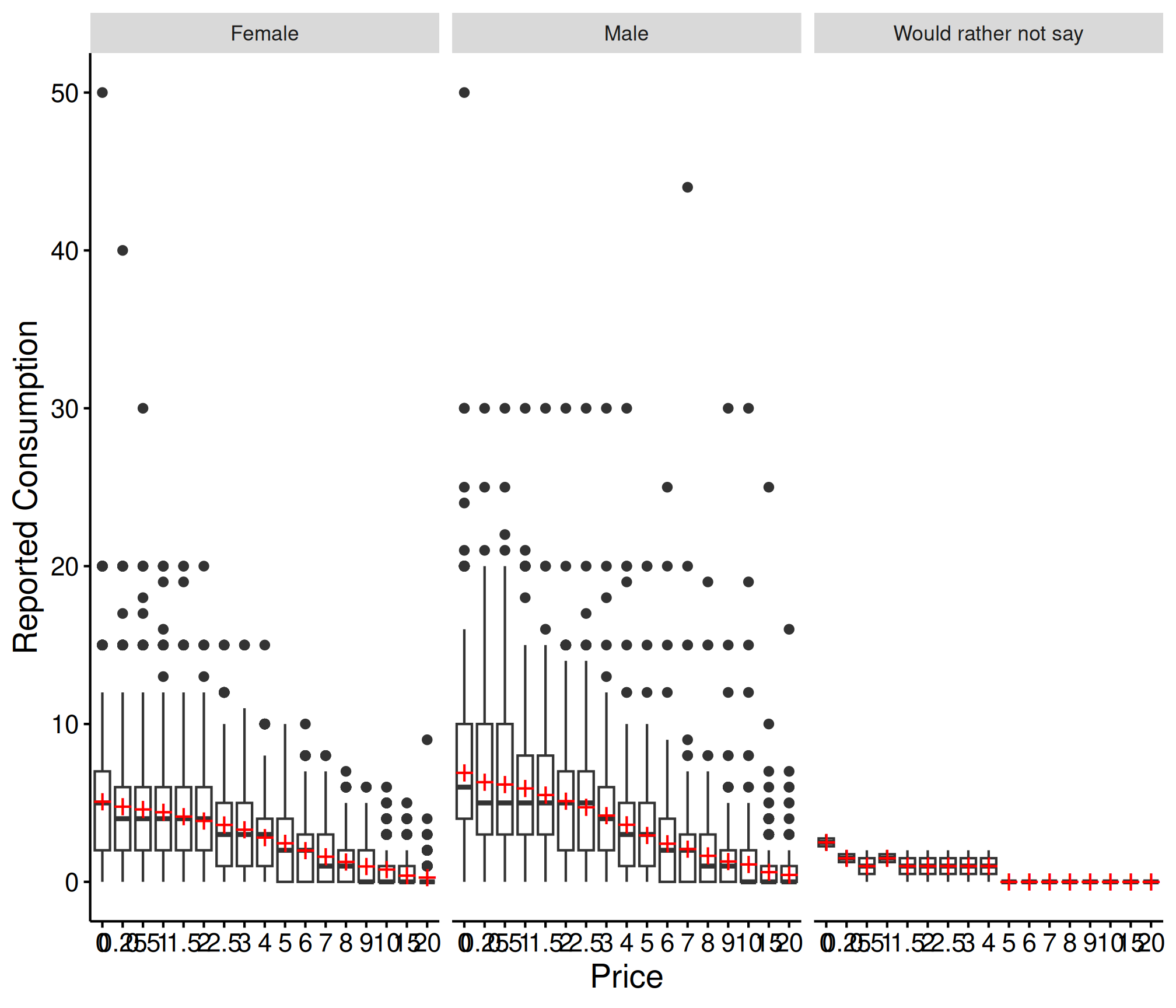
Conclusion
The fit_demand_fixed() interface provides a consistent
API for individual demand curve fitting with full support for the
tidy() / glance() / augment()
workflow. For datasets where borrowing strength across subjects is
desirable, consider the mixed-effects or hurdle model approaches.
See Also
-
vignette("beezdemand"): Getting started with beezdemand -
vignette("model-selection"): Choosing the right model class -
vignette("group-comparisons"): Extra sum-of-squares F-test for group comparisons -
vignette("mixed-demand"): Mixed-effects nonlinear demand models (NLME) -
vignette("mixed-demand-advanced"): Advanced mixed-effects topics -
vignette("hurdle-demand-models"): Two-part hurdle demand models via TMB -
vignette("cross-price-models"): Cross-price demand analysis -
vignette("migration-guide"): Migrating fromFitCurves()tofit_demand_fixed()